
<b>Short answer:</b> The most reliable way to plan auto parts delivery is in fixed waves. The evening before or early in the morning, you import all known garage orders, split them across vehicles and into a morning and an afternoon route, and let the software optimise the stop order based on time windows, load space and vehicle profile. Express top-ups, such as missing brake discs for a car already up on the lift, are collected until a fixed cut-off time and added to the next wave or to whichever route is nearby. At the stop, the driver records the handover with a signature, photo, timestamp and location. Instead of calling the dispatcher, the garage gets a tracking link.
It is 10:40 am at an auto parts wholesaler. The morning route to the regular garages has been running since eight, with two Sprinters on the road. Then a garage calls: the customer's car is on the lift, the brake discs are missing, can they be there by 1 pm? Shortly afterwards comes the second express order, this time a radiator. The dispatcher rings round the drivers: "Where are you right now? Can you squeeze in a run to the next town over?" At the same time, three garages call to ask when their delivery will arrive. In the afternoon the second route starts, and nobody has planned its sequence yet because the whole morning went on phone calls.
This is the classic bottleneck in auto parts logistics. The individual route is not the problem. It gets difficult because several routes per day, tight garage time windows, express orders and proof-of-delivery requirements all come together at once. This guide shows step by step how to plan deliveries to car repair garages in a structured way, when Excel and Google Maps stop being enough and which delivery route planning software suits small and mid-sized auto parts businesses.
Quick overview: which solution fits auto parts delivery to garages?
| Excel + Google Maps | xRouten | OptimoRoute | AntsRoute | PTV Map&Guide | Enterprise TMS / ERP module | |
|---|---|---|---|---|---|---|
| Best for | 1 vehicle, few stops | SMEs with 2 to 30 vehicles | Delivery businesses with many drivers | Field service and delivery businesses | Truck routing, haulage and freight forwarding | Large logistics companies |
| Splitting several routes across vehicles | Manual | Automatic | Automatic | Automatic | With add-on module (OptiFlow) | Yes |
| Time windows and capacity | Only in your head | Yes | Yes | Yes | Depending on module | Yes |
| Proof of delivery at the stop | Paper | Signature, photo, timestamp, GPS in the app | From Pro plan | From Essential plan | Not a core feature | Depends on system |
| Tracking link for customers | No | Yes | Yes | Notification from Essential, tracking link from Pro | ETA via the Driver App | Depends on system |
| Price (as of 12 November 2026) | Existing licences | €25/month route planner (annual) or €30 monthly, app €10 per app/month (annual) or €12 monthly, excl. VAT | Lite USD 35.10, Pro USD 49 per driver/month, 10% discount with annual billing | Lite €34, Essential €54, Pro €74 per vehicle/month excl. VAT, 50% off the first month | Price on request | On request |
| Trial | Not applicable | 14 days, no payment details | 30 days | According to provider | Free trial according to provider (1 user, 10 routes/month) | Project and quotation phase |
| Server location | Depends on account | Frankfurt am Main, Germany (EU) | According to provider | According to provider | According to provider | Depends on system |
Price sources: xRouten pricing, OptimoRoute Pricing, AntsRoute Pricing, PTV Map&Guide. As of 12 November 2026. Please check current prices with the provider before making a decision. OptimoRoute charges in US dollars; the amounts have not been converted into euros.
What is route planning in auto parts delivery and how is it different from Google Maps?
<b>Route planning in auto parts delivery</b> means distributing all of a day's garage orders across vehicles, drivers and time windows so that every part arrives on time and vehicles drive as few empty or duplicate miles as possible. Working out the sequence is only one part of it: that answers the question of the order in which a single vehicle visits its stops.
Google Maps is a good route planner for one person with a handful of destinations. For dispatching in the auto parts trade, however, it lacks some crucial things:
- <b>No splitting across several vehicles:</b> Maps plans one route, not five routes for five Sprinters.
- <b>No time windows:</b> Maps doesn't know that the garage only opens at 7:30 am or that a part has to be at the lift by 1 pm.
- <b>No capacity:</b> Maps doesn't check whether tyre sets, batteries or boxes still fit in the load space.
- <b>Limited number of stops:</b> According to Google Maps Help, you can add up to nine stops including the final destination. Our article on route planners with multiple stops explains how to work around that.
- <b>No proof:</b> Who accepted which part and when stays on paper or in the driver's memory.
Several routes a day are the norm in garage deliveries, not the exception. Garages order in the morning and often need the parts the same day, sometimes within a few hours. If you only plan one route per vehicle per day, you either waste capacity or keep express customers waiting.
What does auto parts logistics demand from delivery route planning?
With auto parts the requirements are especially demanding, because garages are often waiting for parts with a car stuck on the lift. Planning therefore has to cover not only the regular routes but also tight time windows, follow-up deliveries and old parts.
| Requirement | Typical example | What planning has to handle |
|---|---|---|
| Several waves per day | Morning route to regular garages, afternoon route with express orders and follow-up deliveries | Bundle orders per wave and plan each vehicle several times a day |
| Time windows | Garage opens at 7:30 am, part needed at the lift by 1 pm | Take each address's delivery window into account during optimisation |
| Express top-up delivery | Brake discs by 1 pm because the car is on the lift | Prioritise stops and add them to the plan later |
| Capacity and load space | Tyres, batteries, boxes | Respect quantities and vehicle capacities when splitting |
| Vehicle profile | 3.5-tonne van, Caddy, Sprinter with height restriction | Calculate the route according to vehicle size |
| Returns and old parts | Exchange units with core deposit, wrong deliveries, returns | Plan collections as stops of their own |
| Proof of delivery | Who accepted the part and when? | Signature, photo and timestamp at the stop |
| Updates for the garage | "When will my part arrive?" | Live status or tracking link instead of a phone call |
How do you plan several routes a day, step by step?
The following process works for auto parts businesses with two to around thirty vehicles. It separates the predictable routes to regular garages from express orders, so dispatch doesn't have to improvise all day.
Step 1: How do I import orders without retyping addresses?
Export the delivery orders from your inventory or ERP system (or your DMS) as an Excel or CSV file. What matters is the customer name, street, postcode, town, phone number, a notes field (for example "Deliver via the yard, gate 2") and, if available, time window and quantity. You then load this list into your route planning software. Our guide Importing destinations (in German) shows how this works in xRouten via file upload or copy and paste.
Practical tip: store fixed time windows and delivery instructions for your regular garages directly in your inventory system. That way they are included in every export and don't have to be entered again every morning.
Step 2: How do I split orders across vehicles and routes?
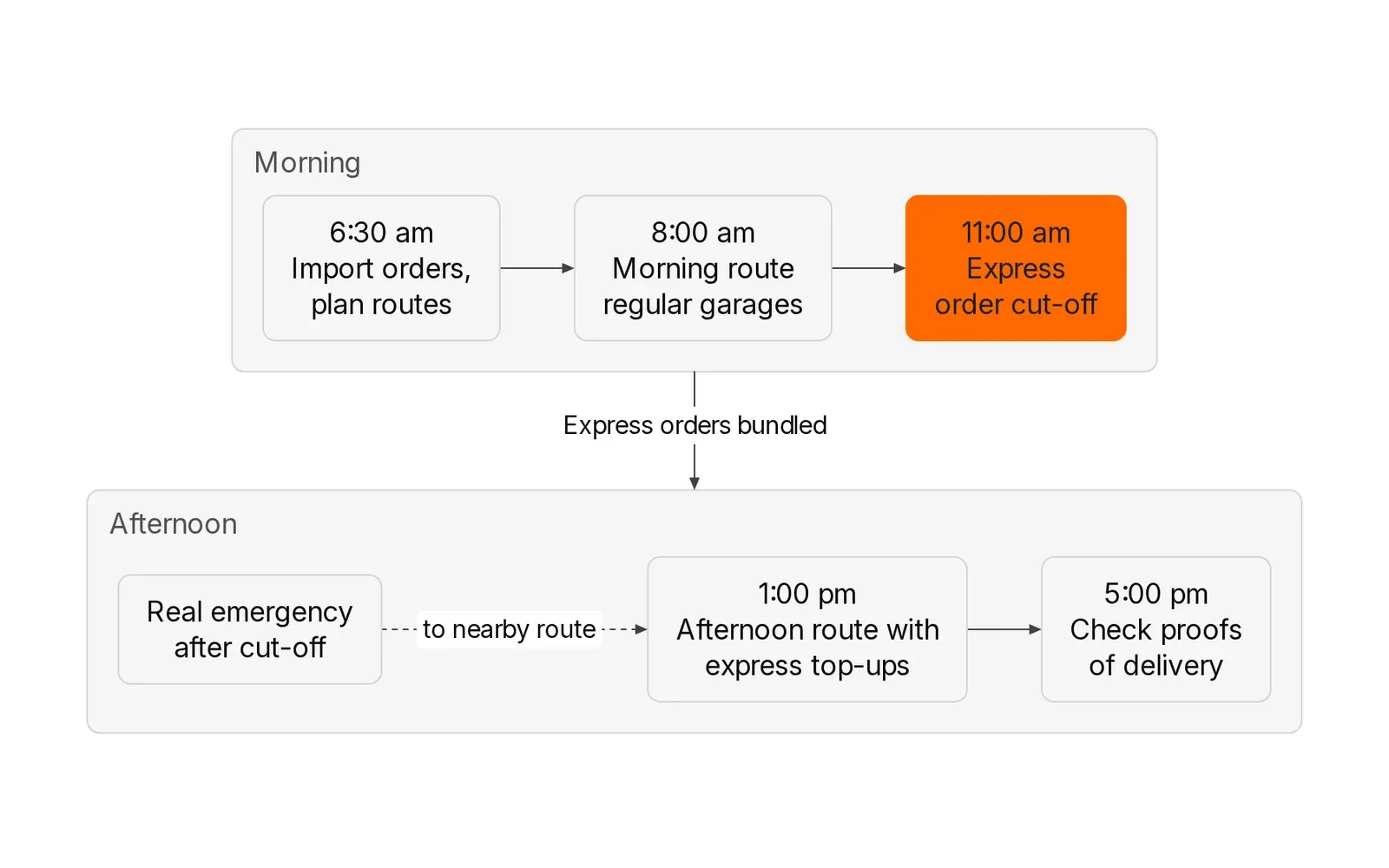
First decide which orders belong in which wave. A proven rule: everything ordered by the evening before goes on the morning route. Everything received by the express cut-off time (for example 11 am) goes on the afternoon route.
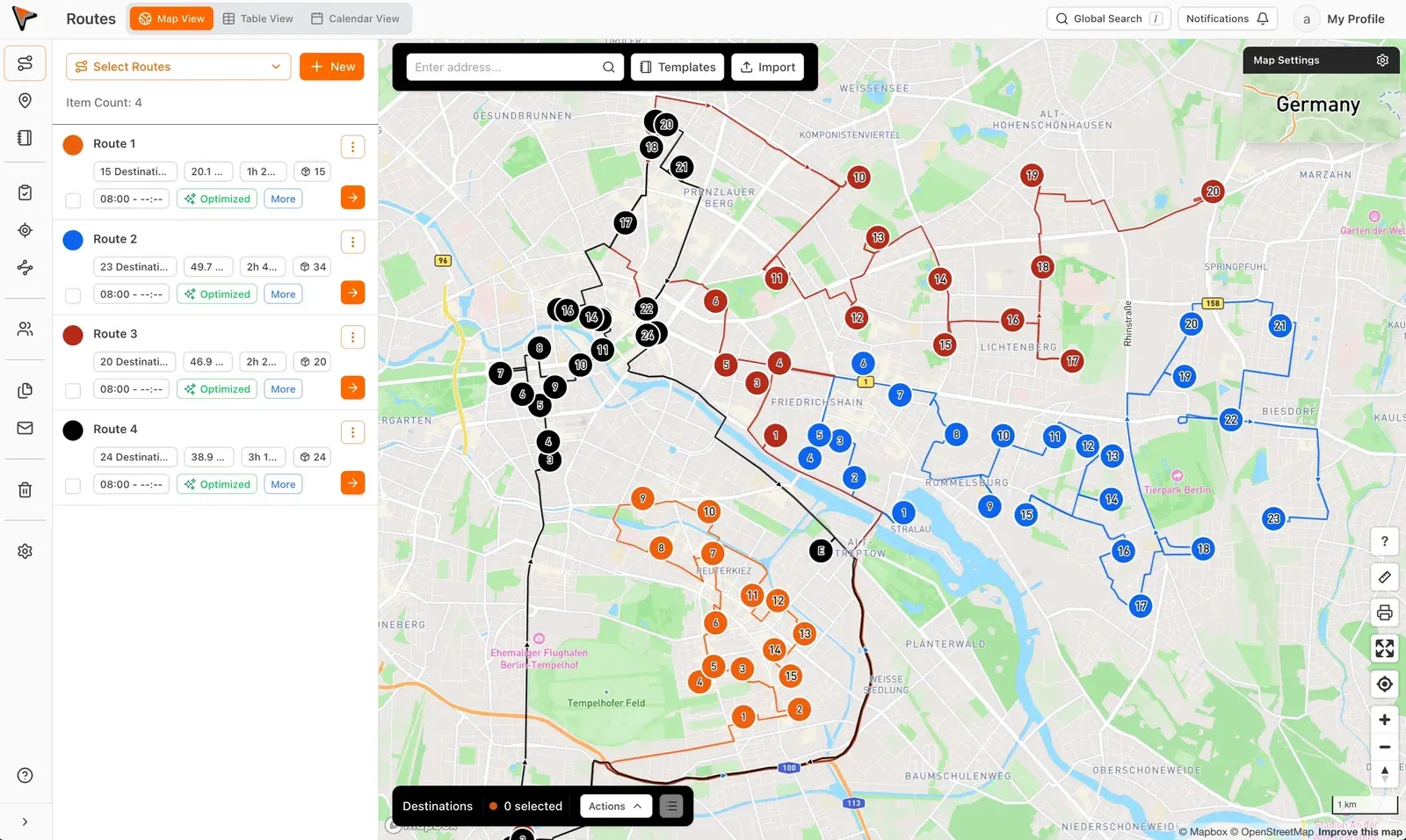
Within a wave, you distribute the stops across the available vehicles. Splitting manually by postcode is a start, but automatic splitting also takes driving times, time windows and capacity into account. Our guide Splitting routes (in German) explains how.
Step 3: How do I optimise the order of stops?
Let the software calculate the sequence of each route automatically. Good optimisation takes into account:
- <b>Time windows</b> for each address, for example "before 11 am" or "at the lift by 1 pm"
- <b>Quantities and vehicle capacity</b>, so nothing is overloaded
- <b>Vehicle profiles</b>, so the 3.5-tonne van isn't sent through a narrow old town centre and certain roads can be excluded
- <b>Time on site</b> per stop, because unloading a set of tyres takes longer than putting a box down in the workshop
You can find more on optimisation with multiple vehicles and stops on our route planning page. It works like a multi drop route planner for your whole fleet.
Step 4: How do I prioritise between regular garages and express orders?
Not every stop is equally important. Flag express orders and garages with tight windows so that they are considered first during planning. Build in buffers deliberately: a route that is calculated to end at exactly 12:00 noon cannot absorb a single extra express order. As a rule of thumb, many businesses leave some slack on every route for follow-up deliveries.
Step 5: How does the route get to the driver?
The finished route goes straight to the driver's smartphone. There the driver sees the stops in the right order and the notes for each address, and can navigate directly from the app. No more slips of paper, printouts or switching to Google Maps.
Step 6: How does the driver document the delivery?
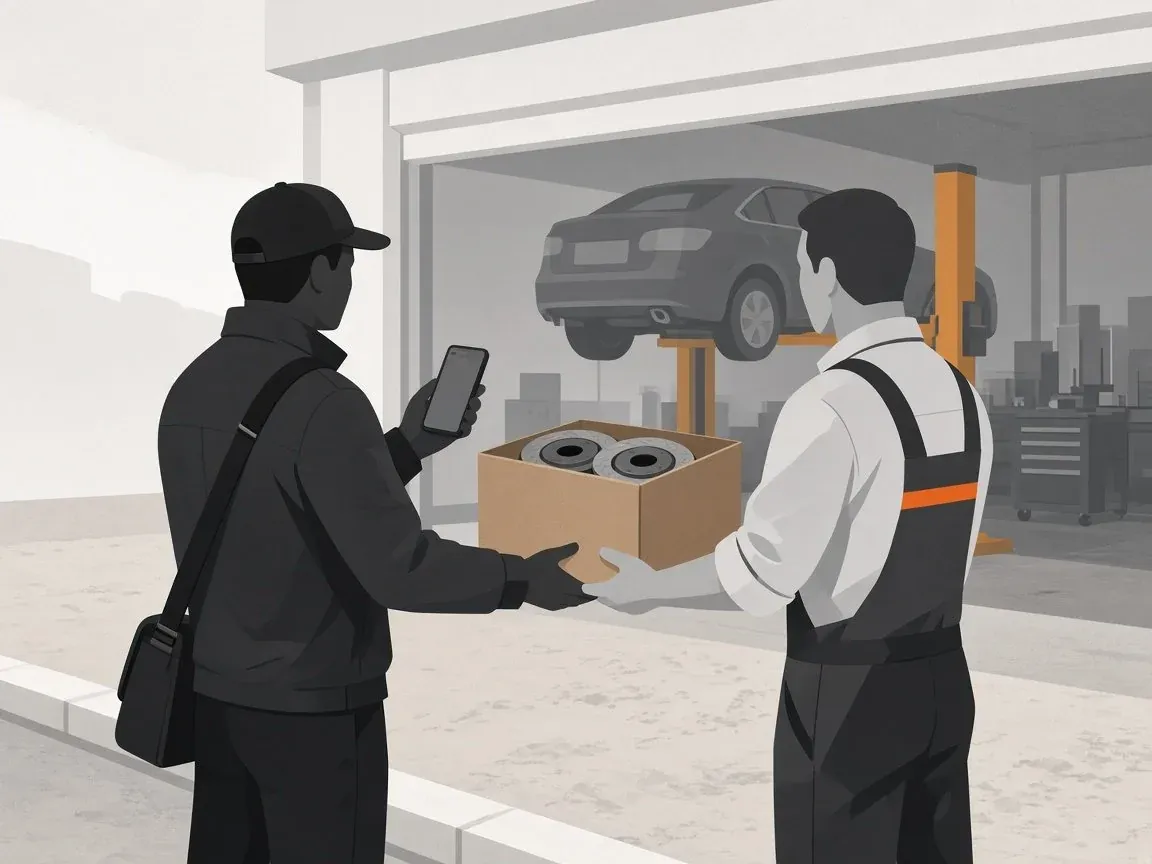
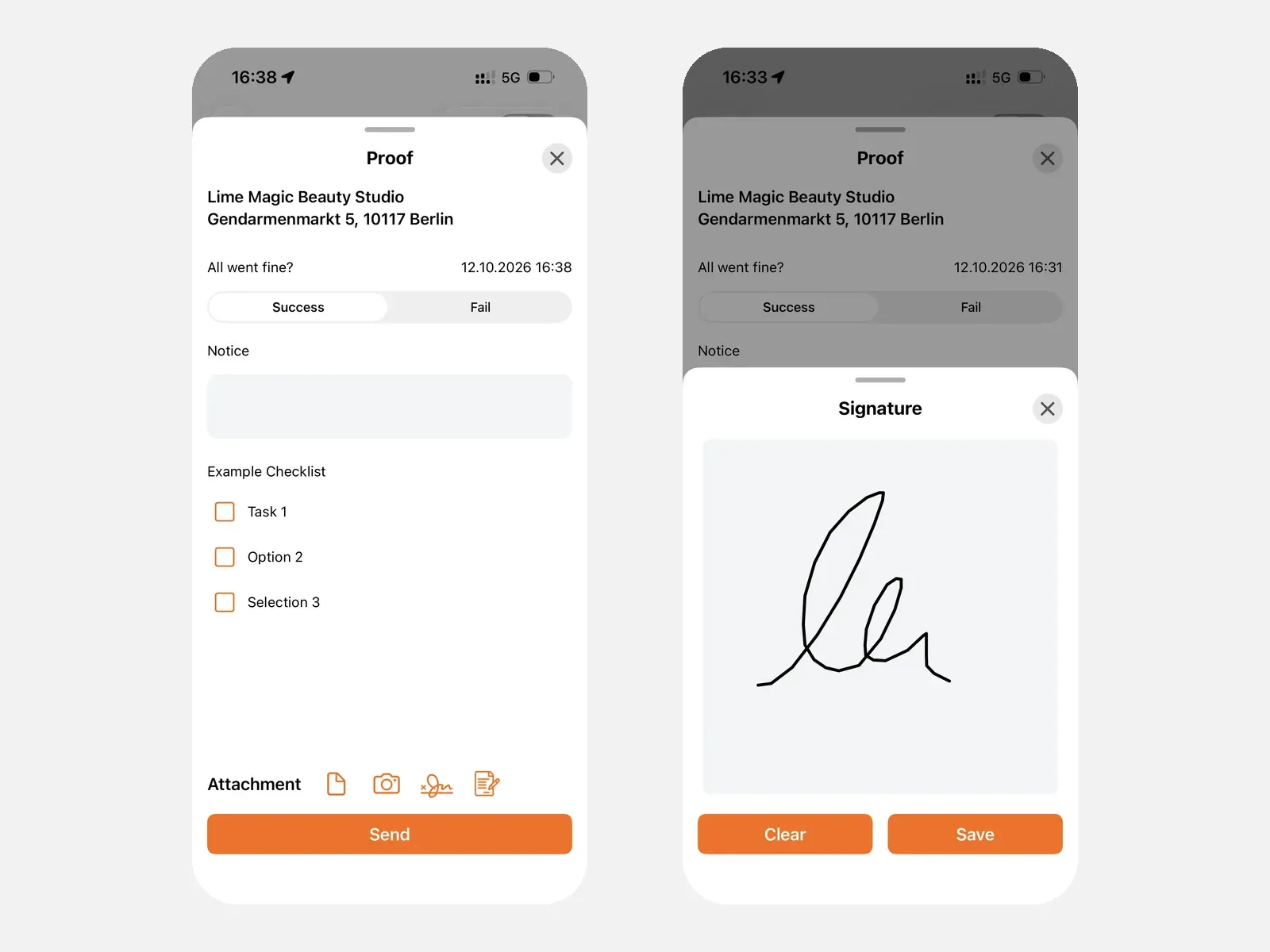
At every stop, the driver captures the proof: recipient's signature, a photo of the goods as delivered, timestamp and location. That way the delivery is documented before the driver is back behind the wheel. More on this in the proof of delivery section below.
How do you handle express top-up deliveries without wrecking the whole plan?
In the auto parts trade, express orders are the reason Excel plans fall apart by mid-morning. Three rules help:
- <b>A fixed order cut-off:</b> Tell your garage customers clearly until what time an order will be accepted for the afternoon route. Anything after that goes into the next wave or carries a surcharge.
- <b>Bundle instead of single runs:</b> Collect express orders until the cut-off and then plan them in together. Every extra departure from the warehouse costs a complete round trip.
- <b>Only real emergencies go immediately:</b> If an order can't wait, for example because a car is on the lift, add it to the route that is currently nearby. Then let the software recalculate the remaining sequence of that route. All other routes stay untouched.
The key is that the dispatcher can see where each route is before rescheduling a stop. That doesn't take a call to the driver, just a look at the route status.
How does proof of delivery at the stop work?
With auto parts in particular, disputes often arise days later: "The part never arrived" or "Two boxes were missing". A paper delivery note in the glovebox is of little help if it only reaches the office at the end of the week.
A digital proof of delivery contains:
- <b>Signature</b> of the recipient, directly on the smartphone
- <b>Photo</b> of the goods handed over or left, for example in front of the workshop door
- <b>Timestamp</b>, set automatically
- <b>GPS location</b> at the moment the proof is captured
- <b>Note</b>, for example "Old brake caliper collected"
In xRouten, the proof is created in the app at every stop. Our route documentation page shows how timestamps, photos and signatures are archived together. If you want to keep working on paper for now or need a transition period, you can download a free delivery note template (German-language).
How does dispatch keep track of all routes?
Most calls between dispatch and drivers revolve around one question: "Where are you right now?" A live overview replaces those calls. Dispatch can see which stops are done, which route is running late and which vehicle is closest to an express order. Our guide Live GPS tracking (in German) describes how to set this up in xRouten.
Important for data protection and for acceptance within the team: in xRouten, a location is only recorded when the driver switches on tracking themselves. There is no permanent background tracking and no telematics hardware in the vehicle. The servers are located in Frankfurt am Main (EU), and we provide a data processing agreement (DPA) under Art. 28 GDPR.
The garage doesn't need to call any more either. Instead of asking "When will my part arrive?", it receives a link showing the status of the delivery. The steps are in our guide Sending a tracking link to customers (in German).
When are Excel and Google Maps no longer enough for garage deliveries?
Excel isn't a bad starting point for route planning. With one vehicle and a few fixed stops per day, some businesses manage well. But once you see these signs, the spreadsheet costs more time than it saves:
- You plan <b>more than one vehicle</b> or <b>more than one route per vehicle</b> per day.
- As a rule of thumb, morning planning takes <b>longer than 30 minutes</b>.
- Express orders regularly lead to <b>single runs</b> from the warehouse.
- Dispatch spends a large part of the morning <b>on the phone</b> with drivers and garages.
- Delivery notes reach the office <b>days later</b> or get lost.
- Only one person in the business knows how the routes are "supposed" to be driven.
You can get a rough estimate of how much time and fuel optimisation could save your business with our savings calculator.
What should auto parts businesses look for when choosing route planning software?
For an auto parts business with a handful to thirty vehicles, an enterprise TMS is usually overkill: a long rollout, prices on request and features for freight forwarders that you will never use. Look for these points instead:
- <b>Excel import</b> of orders from your inventory or ERP system
- <b>Automatic splitting</b> across several vehicles and routes
- <b>Time windows, capacities and vehicle profiles</b> in the optimisation
- <b>Driver app</b> with navigation and proof of delivery
- <b>Tracking link</b> for the garage
- <b>Data protection:</b> servers in the EU, a DPA under GDPR, no permanent driver tracking
- <b>Transparent pricing</b> and a trial with your own data
You'll find a detailed provider comparison in our guide to route planning software. If you are looking for an all-in-one solution for order intake and dispatch, our article on dispatch software for small businesses will help. For our own prices, see our pricing page; competitor list prices are in the table above.
How does xRouten support auto parts delivery with several routes a day?
xRouten is route planning software developed in Germany for businesses with 2 to 30 vehicles, with servers in Frankfurt am Main, so your data stays in the EU. We built it for exactly the daily routine described above: you import orders from Excel, split them automatically across vehicles and routes, and optimise the sequence with time windows, capacities and vehicle profiles. Drivers navigate directly in the app and document every stop with signature, photo, timestamp and GPS. On request, garages receive a tracking link.
The route planner costs €25 per month with annual billing or €30 with monthly billing. The driver app costs €10 per month per app with annual billing or €12 monthly. All prices are excl. VAT. There is no charge per route or per stop. We provide a data processing agreement (DPA) under Art. 28 GDPR. You can see what xRouten offers delivery businesses in particular on our industry page route planning for deliveries.
In Germany, businesses such as 123 Autoteile, Autohaus Dinnebier and Audi Zentrum Ingolstadt use xRouten for their auto parts logistics.
Recurring B2B routes in food wholesale, for example to restaurants with fixed time windows before service starts, follow a different logic from the express waves of garage deliveries. We will cover them in a separate guide once it is published.
<b>Try xRouten free for 14 days. The trial ends automatically, there is nothing to cancel and no payment details required.</b> Import tomorrow's garage orders and plan your morning and afternoon routes with real data: Try route planning for deliveries now
Frequently asked questions about auto parts delivery
How do you plan auto parts delivery routes when garages are supplied several times a day?
Collect all of the day's orders in one list with address, time window and quantity. Divide the orders into delivery waves, for example a morning wave to the regular garages and an afternoon wave with express top-ups. Then distribute them across the available vehicles within each wave. Let the software optimise the order for each route and send the routes to the drivers' smartphones.
What is the difference between delivery route planning and simple route planning?
Simple route planning sets the order of stops for a single vehicle. Delivery route planning (often called vehicle routing or scheduling) also decides which order goes on which vehicle and into which route. It takes time windows, capacities and vehicle profiles into account.
Why are several routes a day the norm in garage deliveries?
Garages often order in the morning and need the part the same day, sometimes within a few hours. A single route per vehicle would either close too early or turn express orders into single runs. That's why many auto parts businesses run at least two waves, one in the morning and one in the afternoon. In dense delivery areas, three or more short routes are common too.
What is the best way to plan express top-up deliveries?
Set a fixed order cut-off and bundle express orders up to that point for the next wave. Only add genuine emergencies, such as a car on the lift, immediately to the route that is currently nearby. Then let the software recalculate the remaining sequence of that route.
Which route planning software is suitable for auto parts businesses?
For businesses with a handful to thirty vehicles, lean route planning tools with Excel import, automatic splitting, a driver app and proof of delivery are a good fit, for example xRouten, OptimoRoute or AntsRoute. Enterprise TMS or ERP modules are more worthwhile for large logistics departments. You'll find a comparison in our guide to route planning software.
How do you document a delivery to a garage?
Have the recipient confirm receipt at the stop with a signature and add a photo of the goods, a timestamp and the location. Digitally captured proof is available in the office immediately and doesn't get lost. If you are unsure about specific legal requirements for your business, talk to your legal adviser.
Can drivers be tracked by GPS during the route?
Permanent tracking of employees is sensitive under data protection law. Employees must be informed and, where they exist, employee representatives consulted. Please check the rules that apply in your country or get legal advice. In xRouten, a location is only recorded when the driver switches on tracking themselves or submits a proof of delivery. There is no permanent background tracking.
How much does route planning software for auto parts delivery cost?
Prices vary widely depending on the billing model. xRouten costs €25 per month for the route planner (annual billing) plus €10 per app per month (annual billing), excl. VAT. OptimoRoute costs USD 35.10 to USD 49 per driver per month depending on the plan, and AntsRoute normally costs €34 to €74 per vehicle per month excl. VAT (50% off the first month). Enterprise solutions are usually priced on request. As of 12 November 2026; please check current prices with the provider.
<b>Read more:</b> You'll find more guides on the xRouten blog and step-by-step help in our guides (in German). The industry page route planning for deliveries shows the way from the Excel list to proof of delivery.
Try xRouten free for 14 days
Try it now