
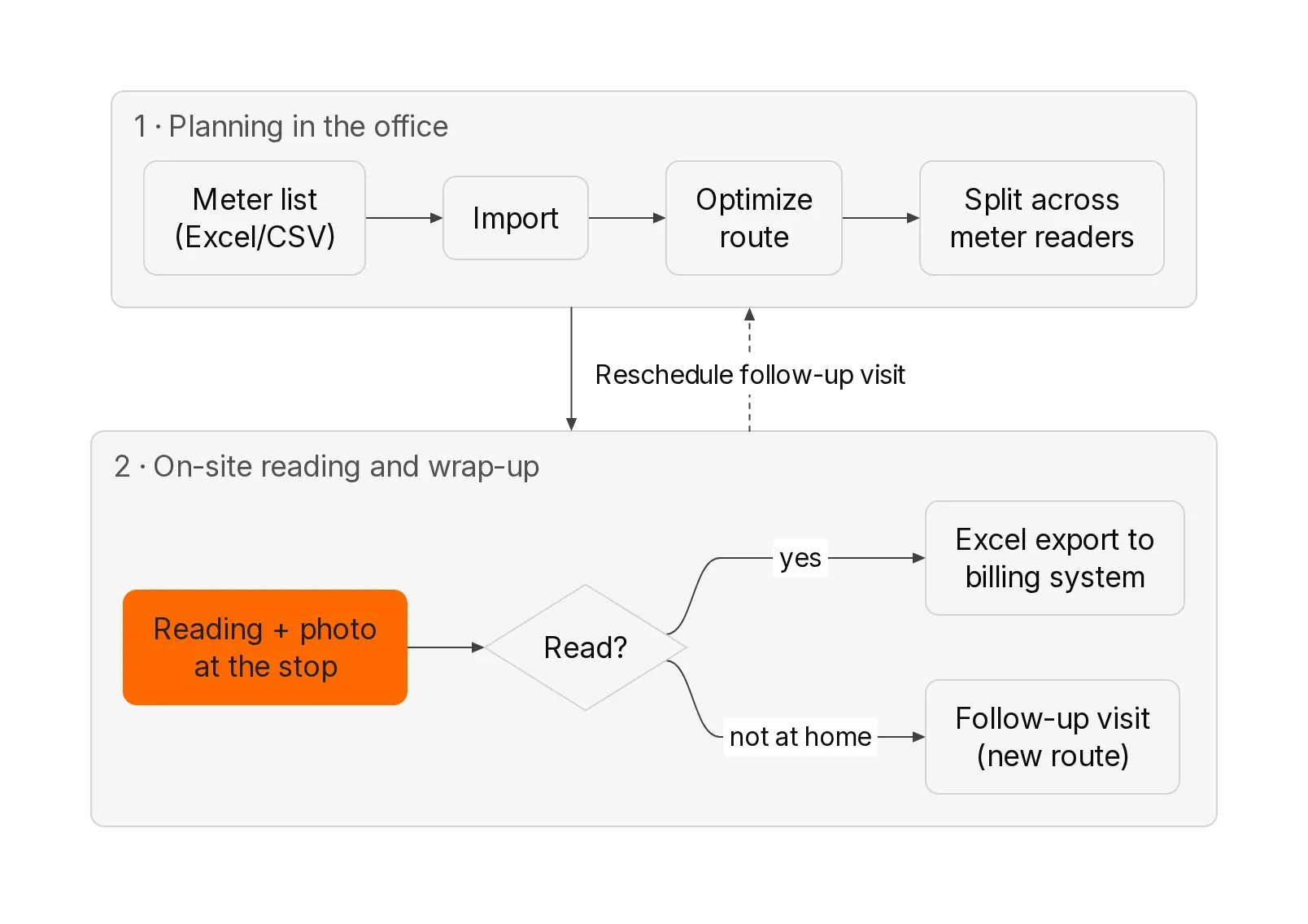
<b>Short answer:</b> The most efficient way to plan a meter reading route for hundreds of meters takes three steps: import the meter list from Excel or CSV, let the software optimize the order of addresses automatically and split the route across several meter readers. Documentation happens right at the stop: the reader enters the meter reading in a dedicated field, takes a photo as evidence and submits the record with a timestamp and location. No more paper list, no more retyping in the office. At the end you export all readings as an Excel file for your billing system.
With a printed reading list, every meter reading is written down at least twice: once in the basement with a ballpoint pen, once in the office when it is typed up. Every copy is a chance for transposed digits, and the route is whatever the reader worked out in their head that morning. This guide is for meter reading contractors, municipal utilities, metering service providers and property managers with their own meter readers. You will see how meter reading works from import to export without paper, when an OCR app like pixometer is the better choice and when route planning with proof of service is.
Quick overview: which solution fits which meter reading operation?
| xRouten (route planning with proof of service) | pixometer team (meter reading app with OCR) | RIB FM Energy (app for a CAFM system) | Paper list and Excel | |
|---|---|---|---|---|
| Focus | Plan, optimize and split routes, document every stop | Capture readings with the camera, dispatch jobs | Capture readings in facility management | Read and retype |
| Capturing the reading | Manual entry in a dedicated proof field plus evidence photo | Automatic via image recognition (OCR) plus evidence photo | Automatic via OCR plus photo | Handwritten |
| Meter identification | Via address, property or meter number in the stop list | Barcode scanner | OCR for the meter number, barcode recognition | Visual check |
| Plausibility check | Not automatic, checked in the office via the export | Min/max values directly in the app | Four-eyes check in RIB FM | None |
| Route optimization | Yes, automatic for hundreds of addresses and several readers | Map view and navigation to the meter, sequence optimization is not advertised | Not included | No |
| Offline | Records are stored without signal and sent later | Syncs when online | Yes | Yes |
| Export | Excel with freely selectable columns, PDF, API | Hand-over to downstream systems | Directly into RIB FM | Retyping |
| Price | Route planner from €25 per month, app from €10 per month and user (excl. VAT), 14-day free trial | On request, 30-day free test account | On request, requires a licensed RIB FM | No license costs, but working time |
Information as of October 2026, checked on xrouten.com/pricing, pixometer.io and rib-ims.com.
1. What is meter reading and who still reads meters on site?
<b>Meter reading is recording the current reading of electricity, gas, water or heat meters on a given date so that consumption can be billed or checked.</b> For businesses this means visiting hundreds or thousands of meters within a fixed time window, reading them and documenting every reading without gaps.
In the B2B world, on-site meter reading is mainly done by these groups:
- <b>Meter reading contractors</b> who carry out the regular reading cycle on behalf of network operators, metering operators or utilities
- <b>Municipal utilities and water companies</b> with their own meter readers, for example for water meters or for customers who do not submit their own reading
- <b>Property managers and housing companies</b> whose caretakers read sub-meters, common-area electricity and water meters across many buildings
- <b>Facility managers and public property departments</b> who track the consumption of their own buildings
A meter reading route is the order in which a meter reader visits their addresses on a given day. With 80 addresses a day, it decides whether they are done by 2 pm or still standing in a stairwell at 5 pm.
2. Won't smart meters make meter reading obsolete soon?
Not as soon as many people think. Two developments matter.
<b>Electricity:</b> Smart meter rollouts differ widely from country to country. Some markets, such as the Nordic countries, read almost all electricity meters remotely. In others, a large share of meters is still read on site or by the customer, and many digital meters display the reading without sending it anywhere. Gas and water meters usually lag well behind electricity.
<b>Heat and hot water:</b> Under the EU Energy Efficiency Directive, heat meters and heat cost allocators installed since 25 October 2020 must be remotely readable, and existing devices must be retrofitted or replaced with remotely readable ones by 1 January 2027, unless this is not cost-efficient. Germany, for example, implements this with a deadline of 31 December 2026. Source: Directive (EU) 2018/2002, Article 9c.
So the work shifts, but it does not disappear. Cold water meters, common-area electricity and gas meters are not covered by this obligation. And the device replacement itself is another route with hundreds of addresses, where every swap should be documented with the old reading, the new reading and a photo.
3. Why do paper lists cost time and money in meter reading?
A paper list is cheap to buy. It becomes expensive in three places that never show up in a cost calculation.
What happens with double data entry?
Every meter reading is noted on paper and typed up in the office later. That takes time, and every copy can swap digits. A wrongly transferred water meter reading is often only noticed when a tenant disputes the bill.
Why is there no proof with paper?
The list shows a number. Whether the reader was at the meter, when they were there and whether the digits really looked like that cannot be checked later. In a billing dispute, an evidence photo with a timestamp helps more than any signature on a form.
How do detours happen without route planning?
The paper list usually follows the sort order of the billing system, for example by customer number. Experienced readers make up for this with local knowledge. When one of them is off sick, the stand-in drives the list from top to bottom.
<b>Sample calculation (assumptions, not measured values):</b> A meter reading service reads 1,200 meters a week with four readers. If retyping takes 30 seconds per meter, that is 10 hours of office work per week. If an optimized sequence saves just 20 minutes of driving per reader per day, four readers over five days add another 6 hours 40 minutes. Run the numbers with your own values.
An example from another industry: the grounds maintenance company Grundstückspflege Müller used to plan with printed Excel sheets. According to the case study, a route that used to take two hours of pure driving now takes a quarter of an hour. It is not a meter reading example, but the pattern of a spreadsheet without optimization is the same.
4. What does meter reading software need to do?
These seven requirements make the difference in practice:
- <b>Import of the meter list:</b> read Excel or CSV from the billing system without creating each address by hand
- <b>Custom fields:</b> meter number, meter type, location and last reading must come along
- <b>Route optimization:</b> calculate the sequence automatically, not just show dots on a map
- <b>Splitting across several readers:</b> break a large list into daily routes or areas
- <b>Capture at the stop:</b> reading, photo, timestamp and location in one step
- <b>Offline capability:</b> meters are in basements, and there is often no signal there
- <b>Export:</b> readings in the column order your billing system expects
Meter readings are consumption data that can be linked to a specific home. So look for servers in the EU and a data processing agreement under Art. 28 GDPR. xRouten hosts in Germany and offers a data processing agreement.
The following steps show the workflow using xRouten, a route planning tool from Germany for businesses with 2 to 30 vehicles. The principles apply to any software that combines planning and proof of service.
5. Step 1: How do you import the meter list from Excel or CSV?
Which columns does the reading list need?
The starting point is a reading list from your billing system. xRouten needs to recognize at least the street and postcode or city. For meter reading, we also recommend these columns:
| Column | Purpose |
|---|---|
| Street, house number, postcode, city | Geocoding and route |
| Meter number | Unique assignment of the reading |
| Meter type (electricity, gas, water, heat) | So the reader knows what to look for |
| Location | For example "basement, room 3, left of the door" |
| Last reading | For the plausibility check in the office |
| Contact person and phone | For caretakers or tenants if access is missing |
If there are several meters at one address, either create one row per meter (cleaner for the export) or one row per entrance with all meter numbers in the notes field (clearer for the reader). Decide this before the first import.
How does the import work in xRouten?
The import is described step by step in the guide Importing stops. In short:
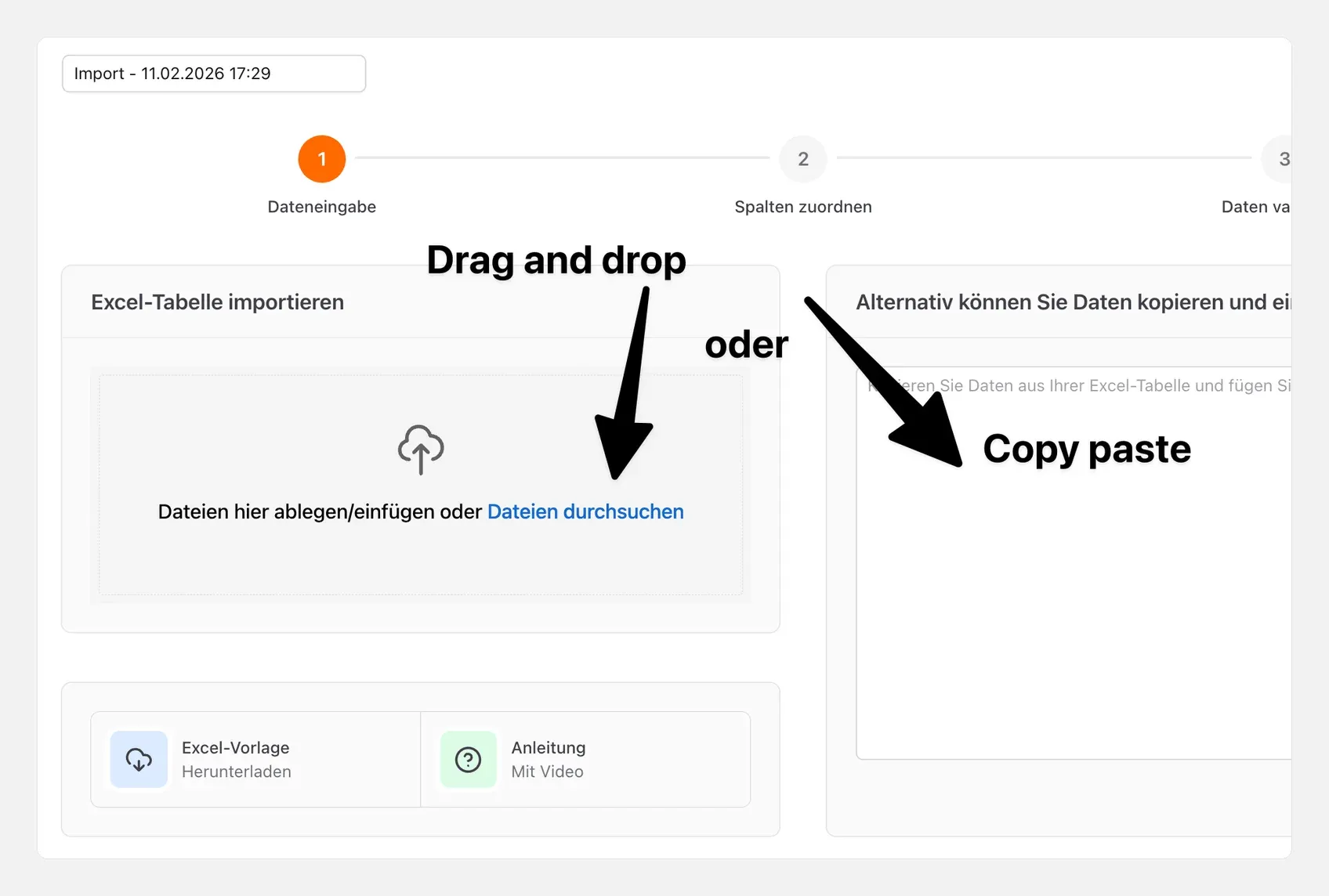
- Create or open a route and click "Import" at the top
- Drag in an Excel or CSV file, select it or paste the rows via copy and paste
- Check the column mapping: xRouten detects the columns automatically, and you mark columns you don't need as "Ignore column"
- In the validation step, switch between table and map, check unrecognized addresses and remove them if needed
- Click "Start import"
Create columns such as meter number or location beforehand under "Settings" → "Custom columns". After that, they are recognized in every import.
Is a fixed meter master list worth it?
Yes, if you read the same meters regularly. In xRouten, recurring objects are called stop templates, each with a unique value such as the meter number. For the next reading cycle, you add the templates to the route via search or multi-select instead of importing again.
6. Step 2: How do you optimize the meter reading route and split it across several readers?
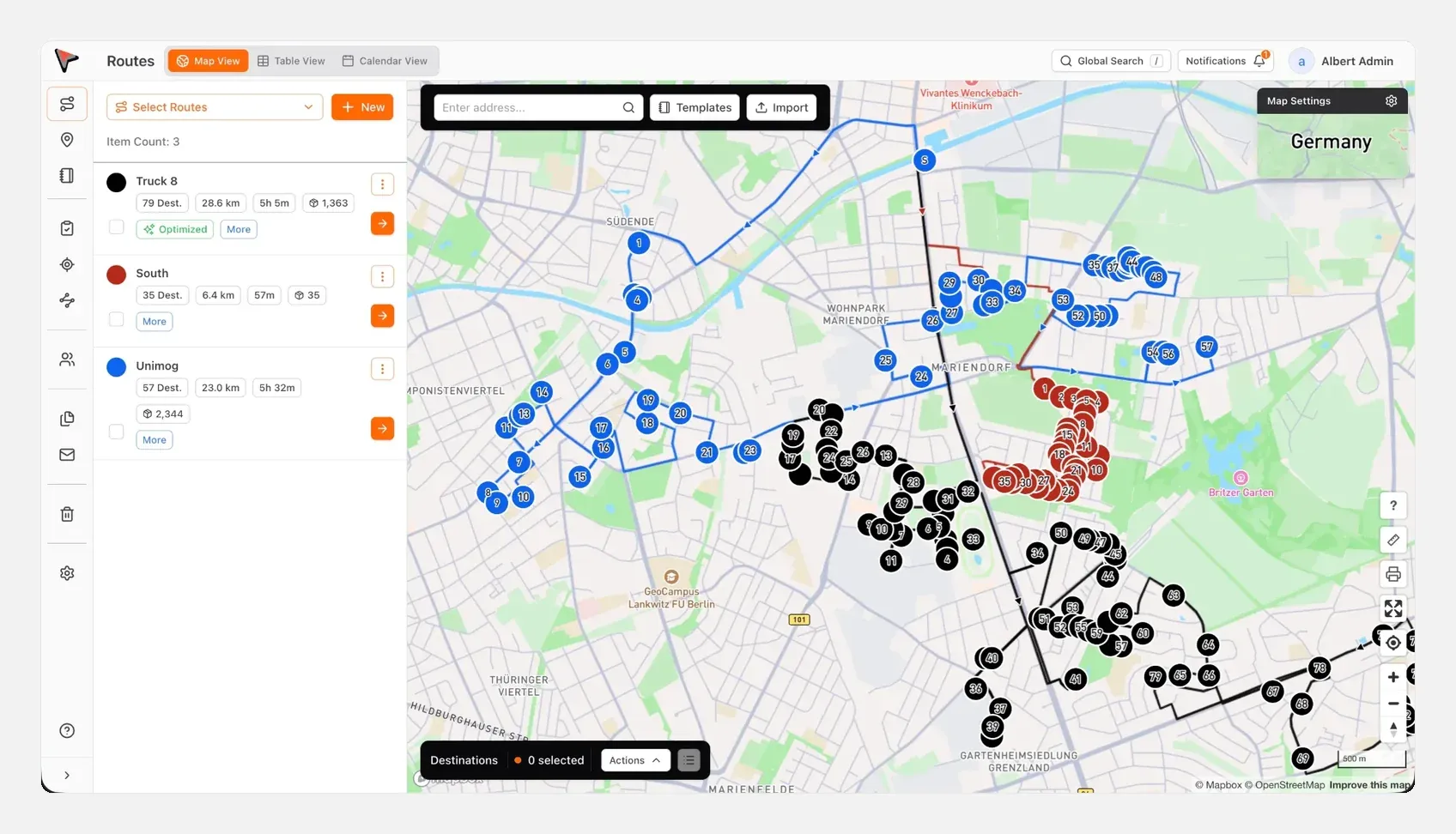
After the import, all addresses are on the map. Now you decide who visits which addresses in which order.
What exactly does route optimization do?
Route optimization calculates the order with the shortest total time from all addresses on a route. In xRouten, click the three dots on the route and then "Optimize". You then see how many minutes and kilometers were saved. If you don't like the result, undo the optimization or drag individual addresses to another position. Details are in the guide Optimize route and on the page Route planning and optimization.
Two settings make meter reading plans more realistic:
- <b>Time per stop:</b> A detached house with one electricity meter takes less time than an apartment block with 24 water meters. Set a suitable time per address, otherwise the arrival times will be off.
- <b>Time windows:</b> For addresses with an announced appointment, such as "Tuesday between 8 and 10 am", add a time window. The optimization takes it into account.
How do you split 1,000 meters across five readers?
Nobody drives a single route with 1,000 addresses. You need daily routes per reader. xRouten has the "Split route" function for this: you specify how many routes to create, give them names such as "Reader 1, Monday" and optionally set start and end addresses. Then you check the new routes on the map and move individual addresses into another route while holding the Shift key. The guide Splitting routes shows all steps.
Two tips from route planning practice:
- <b>Areas before days:</b> Split by area first, then by day. A reader who stays in the same neighborhood for a week loses less time getting there and knows the entrances by day two.
- <b>Plan a buffer:</b> Don't plan the daily route to 100 percent. Meters not reached the previous week need room.
How does the route get onto the reader's phone?
You assign each route to a team member. The route then appears in their mobile app. In xRouten, readers need neither an email address nor their real name. Instead of "Mr Smith" you can name the accounts "Reader 1" to "Reader 5". That helps with seasonal temps and with data protection.
7. Step 3: How do you capture the reading, photo and timestamp right at the stop?
This is where the paper list gets replaced: the reader captures everything the office needs in one step at the meter.
Which proof fields do meter readers need?
In xRouten you create your own proof fields that the reader fills in in the app. A sample configuration for meter reading:
| Field | Type | Example |
|---|---|---|
| Meter reading | Number field | 48,213 |
| Off-peak reading | Number field, only for dual-rate meters | 12,077 |
| Evidence photo | Photo | Photo of the register with the meter number visible |
| Reading status | Checklist | read, no access (not home), meter inaccessible, meter faulty |
| Remark | Note | "Key with the caretaker, ground floor left" |
Since a product update in February 2026, you can define in xRouten which address gets which proof fields. A dual-rate electricity meter then shows two reading fields, a water meter only one. You can set this for individual stops or a whole route at once, as described in the guide Configuring proof fields.
How does the reading work in the app?
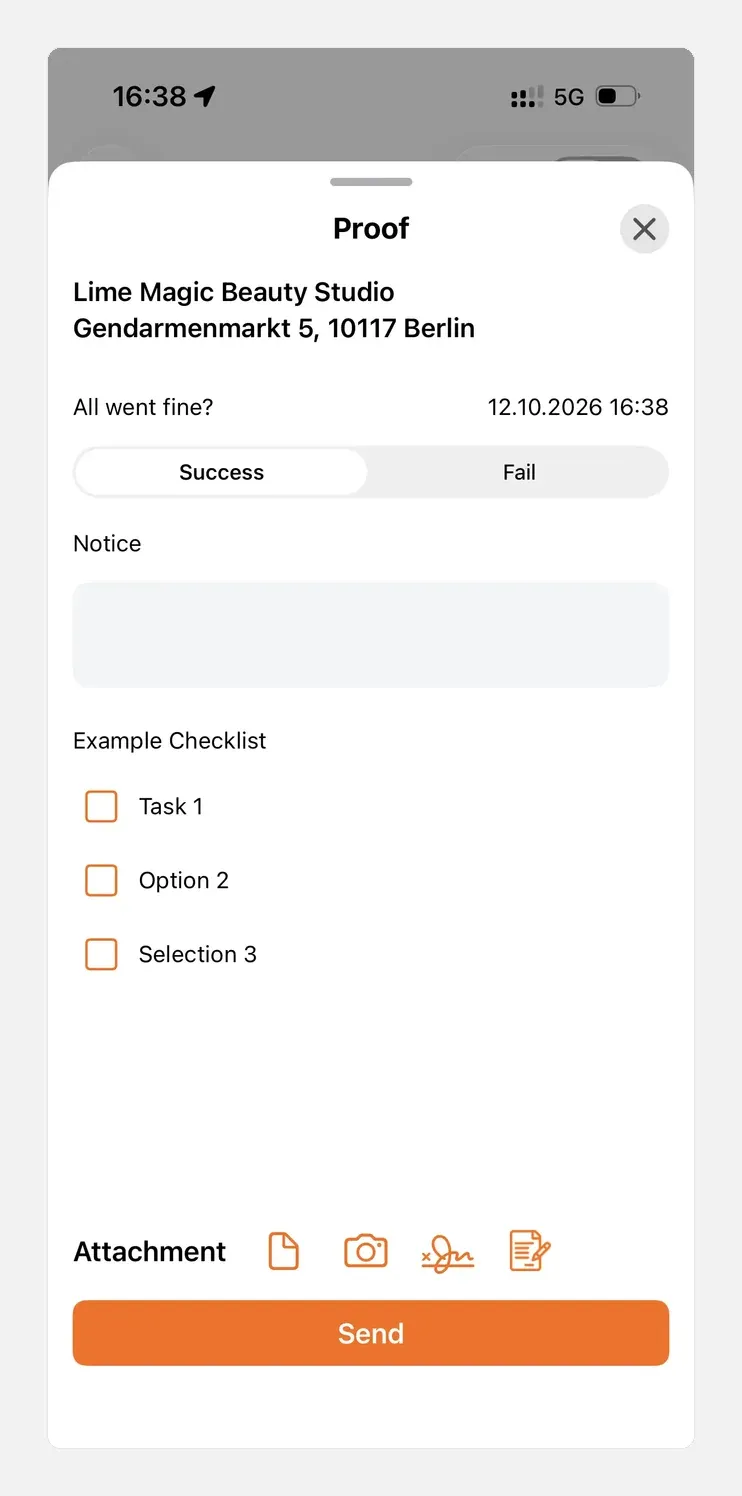
The reader opens their route, taps the orange proof button at the address, enters the reading, photographs the register and taps "Send". The button turns green. On the map they can see at any time which addresses are still open. They can skip addresses or work through them in a different order, for example if a caretaker only unlocks later. The guide Creating a proof of service shows the steps.
Every record gets a timestamp. The page Route documentation describes how timestamps, photos, signatures and GPS location travel from the phone to the office in real time. Each record can hold up to 50 photos or attachments, enough for a plant room full of meters.
<b>What xRouten can't do here:</b> There is no automatic text recognition of the register and no barcode scan of the meter number. The reader types in the reading and the photo serves as evidence. An automatic check against minimum and maximum values in the app is not documented either. You do that check in the office after the export. If OCR is your most important criterion, read section 10.
8. Special cases: what if the meter is inaccessible or there is no signal?
In every reading cycle, some meters stay open after the first visit. These cases need to be documented and carried into the next plan.
What to do when nobody is home?
The reader sets the status "no access" in the record, photographs the locked basement door or the reading card left in the letterbox, for example, and submits it. That proves they were on site at the stated time.
In the office, you give these records their own category, such as "Follow-up", also for several at once. Then you filter by this category. You move the affected addresses into a new route for the follow-up visit while holding the Shift key, as shown in the guide Moving stops to other routes. If you tick "duplicate" when moving, the address also stays in the original route.
What if the meter is inaccessible or faulty?
A remark such as "meter blocked by shelving" with a photo saves your colleague the search at the next visit. Faulty meters get their own status so they don't slip into the export as a normal reading. You can correct categories, notes or missing photos later in the office, individually or for several records at once. The guide Editing a proof of service describes this.
What happens in a basement with no signal?
Meters are located in basements, pits or plant rooms. Mobile reception there is often weak. In xRouten, records are stored locally on the phone without a signal and sent automatically as soon as there is a connection again. Two check marks show that the record has reached the server.
9. Step 4: How do the readings get back into the billing system?
How does the Excel export work?
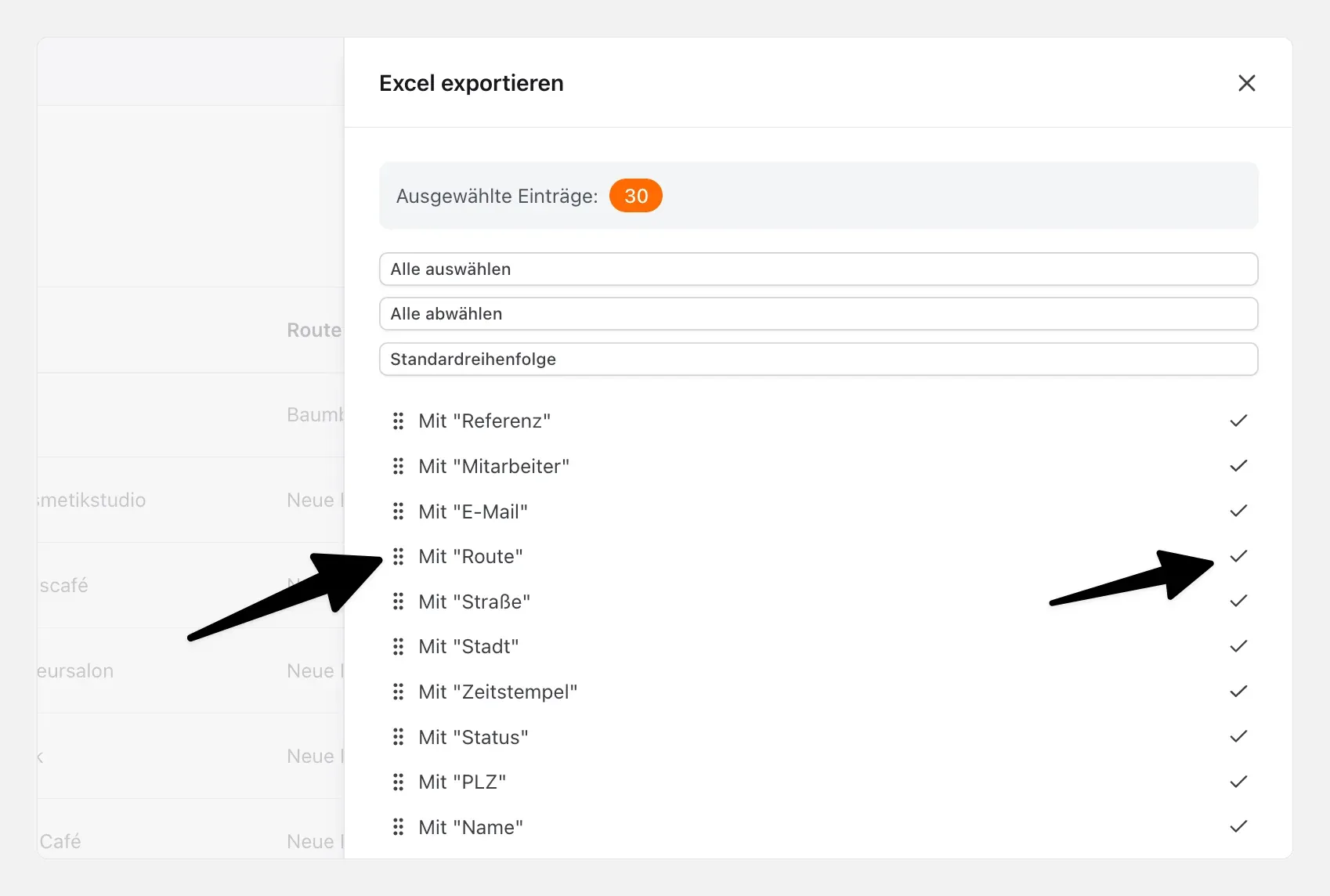
In xRouten, open "Proofs", filter by route, category or time period, select the entries you want and choose "Export as Excel". In the export dialog you define which columns appear in the file and in which order. xRouten remembers this setting for the next export. According to the product update of 2 February 2026, several thousand entries can be exported at once, and earlier exports remain available for download. The guide Exporting proofs shows the steps.
For billing, a fixed column order that matches your billing system's import format works best, for example:
- Meter number
- Reading date (timestamp)
- Meter reading
- Off-peak reading (if any)
- Reading status
- Remark
Define this order once and test the re-import with ten records before the reading cycle starts.
How do you check the values for plausibility?
Because xRouten does not check against limits in the app, the plausibility check belongs in the export. In Excel, compare the imported last reading with the new one. Watch out for negative consumption, a multiple of last year's value and unchanged readings in occupied units. Then check the evidence photo instead of driving out again.
What about PDF proofs and interfaces?
For clients or disputes, export individual records as a PDF with photo and timestamp, or several PDFs at once. According to xrouten.com, the export is unlimited and included in every plan. If you want to transfer the data directly into your own system, use the xRouten API. The effort involved is best clarified with your software provider.
10. OCR app or route planning with proof of service: what do meter reading services really need?
Anyone searching for a meter reading app quickly ends up with apps that use image recognition. They solve a different problem than route planning.
When is an OCR app like pixometer the better choice?
pixometer team by the German provider pixolus specializes in high-volume meter reading. According to the vendor, the solution consists of a dispatch portal for the back office and a reader app. The reading is captured via image recognition and checked against minimum and maximum values. A barcode scanner recognizes the meter number, and an evidence photo records every reading. Readers can reject jobs with a reason and create unknown meters on site.
pixometer describes how this works in practice with the German municipal utility Stadtwerke Langen: of 51,000 readings in total, 31,500 were documented via the app, partly by customers reading their own meters and partly by the utility's meter readers. pixolus does not publish prices, and a 30-day test account is free.
The RIB FM Energy app works in a similar way: OCR for reading and meter number, offline-capable, with a four-eyes check. However, it requires the CAFM system RIB FM with the energy management module and is aimed at facility managers who already use RIB FM.
<b>An OCR app is the better choice if:</b>
- You read tens of thousands of meters a year and every second of input counts
- You need a plausibility check directly at the meter
- You want to combine customer self-reading and reading by staff in one system
When is route planning with proof of service the better choice?
Image recognition saves seconds at the meter, the route saves minutes between meters. According to its product description, pixometer guides the reader to the meter via a map, but an automatic optimization of the sequence across hundreds of addresses is not advertised on the product page (as of October 2026).
<b>Route planning with proof of service like xRouten fits better if:</b>
- Your meters are spread across many addresses, for example water meters in residential areas, outdoor meter pits or public buildings
- You use several readers and split the work in Excel today
- Besides reading, your team also handles meter replacements, maintenance or other field service routes and doesn't want a separate app for every task
- You need a fixed, public price and want to start without an implementation project
Can you combine both?
Yes. For larger meter reading services, that is often the most honest answer. Route planning handles areas, sequence and splitting. The OCR app handles capture at the meter. The price is two apps and two systems. With one meter per house, the route is the bigger lever; with 40 meters per apartment block, it's the capture.
11. Who benefits from a digital meter reading route: contractor, utility or property manager?
Meter reading contractors
What counts for you is readings per hour, so splitting and optimization, plus proof for your client. If you add the network operator or utility as an observer, they only see the records you release to them.
Municipal utilities
A utility's own meter readers often also replace meters or inspect service connections. In that case, one shared route planning tool for all these routes makes sense. If you already use an OCR app, you only add route planning.
Property managers and housing companies
Here the caretaker usually reads meters on the side across many buildings. The biggest gain is the proof: reading with photo and date for every unit, available as a PDF when tenants have questions. With the EU deadline of 1 January 2027 for remotely readable heat meters and heat cost allocators, it pays to plan the device replacement as its own documented route right away.
12. How do you get started with digital meter reading?
- <b>Export the reading list:</b> Take an area with 100 to 200 meters from your billing system and clean up the address columns.
- <b>Define the fields:</b> Create meter number and location as custom columns and define the proof fields reading, reading status, photo and remark.
- <b>Import and optimize:</b> Import the list, split it across two readers and optimize both routes.
- <b>Test for one day:</b> Send out one experienced and one new reader and ask both in the evening what was missing.
- <b>Check the export:</b> Export the records in your target format and re-import ten values into the billing system as a test.
Then roll the approach out to the full reading cycle. You can find more step-by-step guides at xrouten.de/anleitung, case studies from other businesses at xrouten.de/referenzen and more guides on the xRouten blog.
<b>Try xRouten free for 14 days. The trial ends automatically, there is nothing to cancel and no payment details required.</b> Import your own reading list and capture your first meter reading with a photo at the stop: Try route documentation now
Frequently asked questions about meter reading
How do you plan a meter reading route for hundreds of meters?
Import the meter list as an Excel or CSV file into a route planning tool, let it optimize the order automatically and split the list into daily routes per reader. Plan a realistic time per address, because an apartment block with many meters takes longer than a detached house. Split by area first, then by day.
What software do meter reading services need: OCR app or route planning?
It depends on where you lose time. An OCR app like pixometer reads meter readings via the camera, which pays off with many meters per address. Route planning with proof of service like xRouten optimizes the trips between scattered addresses and documents every stop. Larger meter reading services often combine both.
What happens if the meter is inaccessible?
The reader sets the status "no access" or "inaccessible" in the record, takes a photo as evidence and notes the reason. That documents that they were on site at the stated time. In the office you mark these cases with their own category and move the addresses into a route for the follow-up visit.
How do the readings get into the billing system?
Via an Excel or CSV export of the records. In xRouten you define the columns and their order once, for example meter number, reading date and meter reading. The system remembers this selection. Test the re-import with a few records before the first large reading cycle. For a direct transfer there is also an API.
Can xRouten recognize meter readings automatically with the camera?
No. In xRouten the reader types the reading into a dedicated proof field and the photo of the register serves as evidence. xRouten does not offer automatic text recognition or barcode scanning. If you need that, specialized apps such as pixometer team or RIB FM Energy are the better choice.
Does digital meter reading work in a basement without signal?
Yes. In xRouten, records are stored on the phone without a mobile connection and sent automatically as soon as there is signal again. Two check marks show that the record has reached the server.
Are meter readers tracked by GPS?
Not permanently. In xRouten, the location is only shared when the team member turns on the GPS switch in the app themselves. There is no background tracking and no telematics hardware in the vehicle. Names can be replaced with labels such as "Reader 2".
How much does meter reading software cost?
With xRouten, the route planner starts at €25 per month and the mobile app at €10 per month and user, both excl. VAT. You can test it for 14 days free of charge and without payment details. pixometer and RIB IMS don't publish prices; terms are available on request.
Try xRouten free for 14 days
Try it now