

<b>Short answer:</b> Industry software and ERP systems manage orders, customers and invoices. Route planning software decides which driver visits which address in which order. It also records what happened on site. Rule of thumb: as soon as several vehicles run changing routes every day, or you need photos and signatures from the road, a dedicated route planner connected to your industry software pays off.
Many businesses that contact us already have software for everything. Orders live in the ERP, invoices go out from the warehouse system, the office maintains customers in the CRM. And yet, every morning someone sits with a printed order list in front of Google Maps and sorts addresses by hand. Photos from the site or the drop-off point arrive via WhatsApp and get copied into the order in the evening.
That is not a failure of the industry software. It was built for something else. This guide shows where order management ends and route planning begins. You will see how to tell when the built-in routing module is no longer enough, and how both systems work together via Excel import, integration or API — without replacing the industry software you already use.
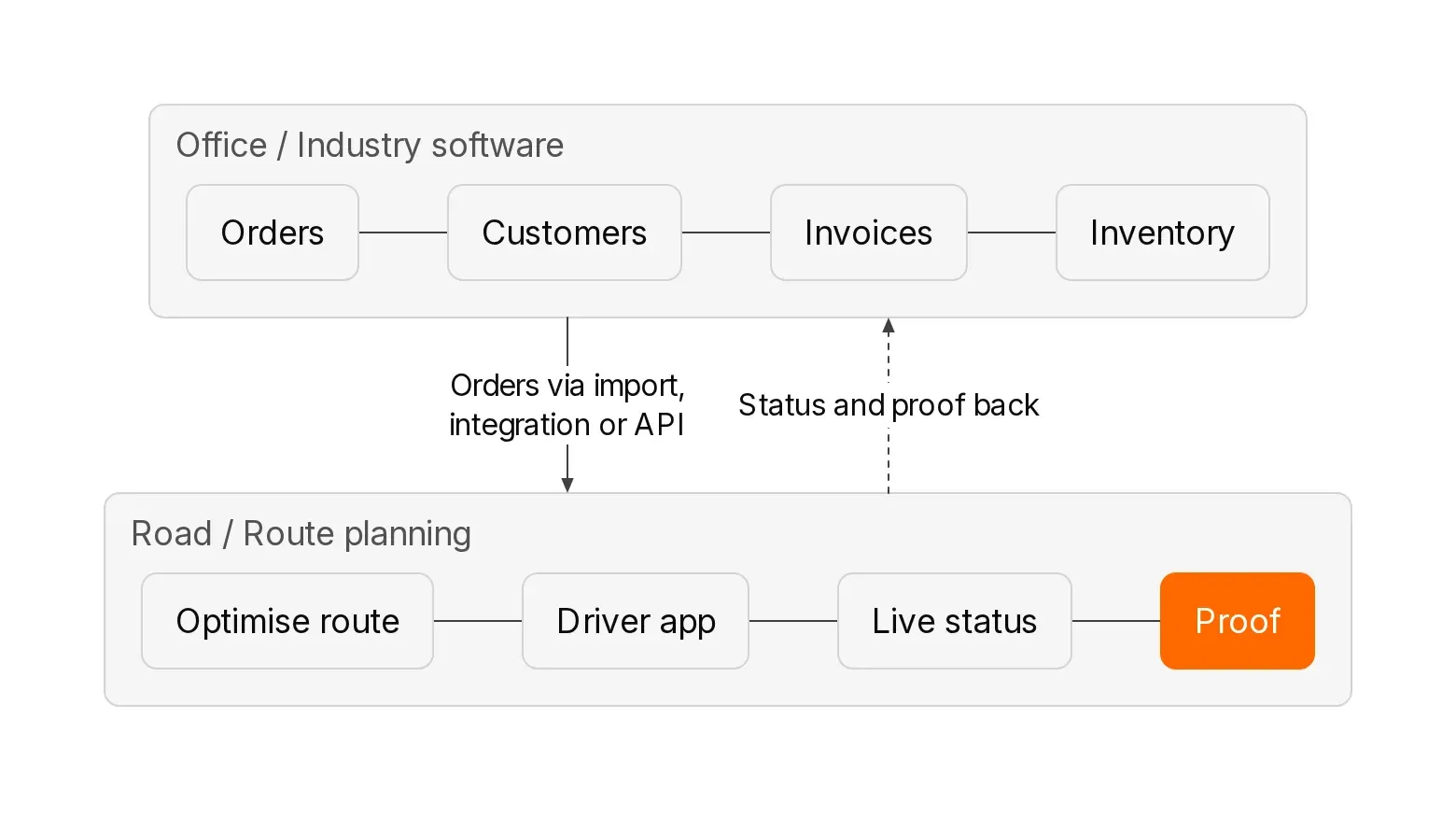
In short: is your industry software’s routing module enough?
| Your situation | Built-in routing module or planning board usually enough | Dedicated route planning software with a connection pays off |
|---|---|---|
| Vehicles and routes | One vehicle or fixed routes that rarely change | Several vehicles visiting different addresses every day |
| What is planned | Mainly who goes to which appointment when | Also the stop sequence across several vehicles |
| Constraints | Few time windows, no quantities or capacities | Time windows, quantities, start and end addresses per vehicle |
| Drivers on the road | Drivers know their route; Google Maps navigation is enough | Drivers need route, navigation and site notes in one app |
| Proof of delivery | A paper delivery note is enough | Photos, signatures, timestamps and location per stop |
| Customer updates | Customers rarely call about arrival time | Customers should get a tracking link with ETA |
| Industry | Time-based planning, e.g. home care with rostering and billing | Location-based planning, e.g. delivery, waste collection, winter service, on-site service |
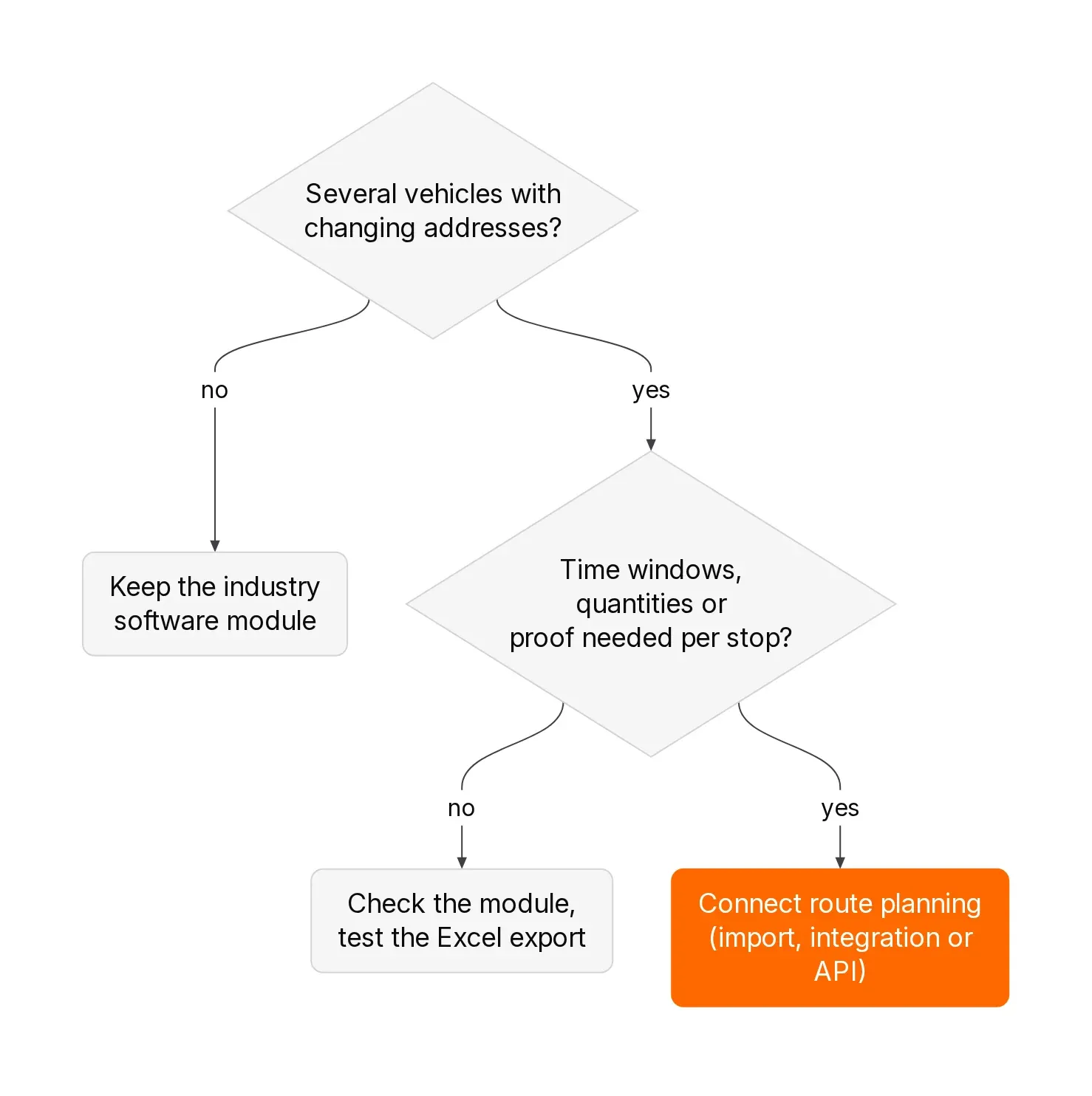
If you recognise three or more rows in the right-hand column, route planning is a separate job in your business. You do not need to replace the industry software. A second system takes care of the road and exchanges data with the first.
Information as of October 2026, checked on xrouten.com, gabler.de (German business encyclopaedia), medifoxdan.de and hero-software.de.
1. What is industry software, what is an ERP system, and what is ERP route planning?
<b>Industry software is software tailored to the workflows of a specific industry</b> — for example trades and contractors, home care, waste collection or wholesale. The Gabler Wirtschaftslexikon (a German business encyclopaedia) describes it as software products for business data processing that are “aimed at use in specific industries” (Gabler).
<b>An ERP system (Enterprise Resource Planning) connects a company’s business processes on a shared data foundation.</b> According to Gabler it typically includes modules for procurement, production, sales, asset management, HR, and finance and accounting (Gabler).
What is the difference between industry software and ERP?
The terms are not mutually exclusive. An ERP is designed to work across industries. Industry software can be an ERP for one industry, or cover only part of it — for example quotes and invoices for trades. In day-to-day language both mean the same thing: the system where orders are created and billed.
What does ERP route planning mean?
ERP route planning usually means one of two things:
- <b>A routing module inside the ERP or industry software</b> that assigns orders to vehicles or staff and sometimes suggests a sequence.
- <b>Standalone route planning software connected to the ERP</b> that takes orders from the ERP, calculates routes, sends them to drivers’ phones and reports status and proof back.
Both approaches are valid. Which one fits depends on what happens on your roads.
2. What is industry software good at, and what was it built for?
Industry software is strong where documents, master data and money are involved. That work does not belong in a route planner.
ERP and warehouse systems in wholesale and delivery
An ERP or warehouse system knows products, stock, prices and open invoices. An order becomes a delivery note and then an invoice. The system knows what is delivered to whom. It usually does not know in which order a driver should visit 35 customers when three of them only accept deliveries in the morning.
Trades and contractor software
Trades software manages quotes, measurements, projects, time tracking and invoices. Many programmes include a digital planning board where you assign staff, vehicles and tools to jobs — for example the planning board in HERO (German trades software) with day, week and month views. A planning board answers who is on which site on which day. For an electrician with two sites a day, that is exactly the right question.
Home-care software
Home-care software for ambulatory services combines care documentation, service billing and rostering. Here route planning belongs in the industry software for good reason. MEDIFOX DAN, for example — a widely used German ambulatory-care system — factors qualifications, fixed and preferred times, shared households and visit frequencies into its AI-supported routing and ties it directly to the roster (medifoxdan.de). Only the care software knows those criteria. Local home-care packages often work the same way: built-in rostering usually beats an external route planner. For care providers, the built-in module is normally the better choice.
Waste and skip-hire software
Software for waste collectors and skip operators manages containers, sites, contracts, weigh tickets and billing. How routes for waste collection can be calculated is covered in the guide Route optimisation in waste collection (in German).
What all four examples share: they capture <b>what</b> needs doing and <b>what it costs</b>. How the day runs on the road is a second question.
3. What happens on the road, and why is that a separate job?
As soon as an order leaves the office, questions appear that have nothing to do with documents. Who visits which address in which order? What happens to the rush job at 9:40? And how does the proof come back that the pallet was left at the ramp?
How does multi-vehicle route optimisation work?
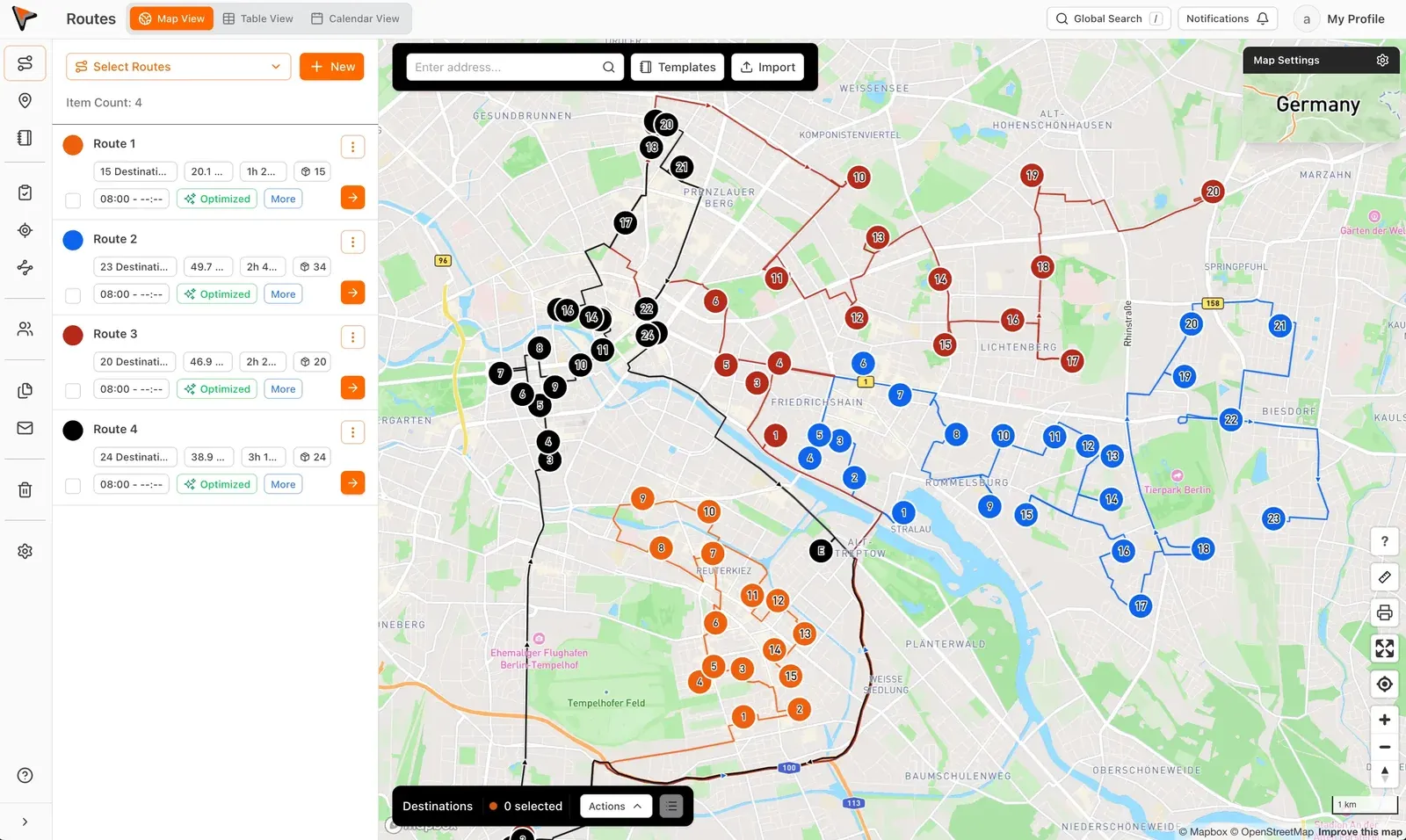
Route optimisation calculates, from all of a day’s addresses, the sequence with the shortest total time. With several vehicles a second decision appears: which address belongs on which route. Both depend on each other. An address that is a detour on route A may sit directly on the way for route B.
Add the constraints:
- <b>Time windows:</b> the customer only accepts between 7 and 10 a.m.
- <b>Quantities and capacities:</b> the vehicle only holds a certain number of pallets, crates or containers.
- <b>Start and end addresses:</b> one driver starts from home, another from the depot.
- <b>Dwell time:</b> a service call takes an hour; a parcel drop takes two minutes.
Even with 10 stops there are more than 3.6 million possible sequences (10 factorial). That is why route planners use specialised algorithms and real road data. A module that sorts orders by postcode solves a simpler problem.
Why do drivers need their own app?
The driver does not need an invoice screen. They need their route in the right order, navigation, notes such as “rear entrance, code 4711”, and a button for proof of delivery. Dispatcher changes must reach the phone immediately. How that looks in xRouten is shown on Driving routes (in German); the product overview is on xrouten.com.
Why does live status belong with route planning?
A customer asks when the delivery will arrive. Without live status the office first calls the driver, then calls the customer back. With live status the dispatcher sees which stops are done. With a tracking link the customer sees the estimated arrival time themselves.
Why is proof of delivery the real bridge?
Photos, signatures, timestamps and location are created at the door, not in the office. Later they belong with the order in the industry software — for example as an invoice attachment or as evidence for a complaint. That is where the two systems must talk. More on documentation on the road is on Documenting routes (in German).
4. Industry software or route planning: who owns which task?
The table shows a typical split. Some industry software covers individual rows on the right — and that is fine.
| Task | Industry software or ERP | Route planning software |
|---|---|---|
| Customers, contracts, prices | Leading — master data lives here | Only takes address, contact and notes |
| Create order | Leading | Receives the order via import, integration or API |
| Assign staff and vehicles to a day | Planning board or roster | Assigns stops to vehicles and splits large lists |
| Calculate stop sequence | Rarely or in simplified form | Core job, with time windows and quantities |
| Put the route on the phone and navigate | Sometimes via a staff app | Core job, with real-time changes |
| Live status and tracking link | Rare | Core job |
| Proof at the stop (photo, signature, timestamp) | Sometimes, depending on industry | Core job, configurable per stop |
| Invoicing, dunning, accounting | Leading | Not intended |
The rule of thumb: <b>Where money and master data are involved, industry software leads. Where addresses, sequences and proof from the road are involved, route planning software leads.</b> Neither side should be maintained twice.
5. How do you know the built-in routing module is no longer enough?
Walk through these seven points with your dispatcher and answer as the day actually looks, not as the manual says.
- <b>The sequence lives in someone’s head.</b> The module says which orders are due today. The dispatcher or the driver sets the order, often with Google Maps open beside them. Google Maps stops after ten destinations.
- <b>Several vehicles are planned one after another, not together.</b> Route 1 is filled first, then route 2. Nobody checks whether an order would sit better on route 2, because it takes too long.
- <b>Time windows exist only as a note on the order.</b> “Mornings only” sits in free text. Planning does not use it, and the driver notices only on the road.
- <b>Changes go out by phone.</b> A rush order or a cancellation is passed to the driver by phone. The software knows nothing about it.
- <b>Photos and signatures arrive via messenger.</b> Drivers send pictures via WhatsApp or email. Someone in the office assigns them to orders in the evening.
- <b>Customers keep asking when the driver will arrive.</b> The office can only answer by calling the driver.
- <b>New drivers need weeks before they can run a route alone.</b> Knowledge about access, codes and drop-off points lives in experienced colleagues’ heads, not in the system.
If three or more points apply, you lose time every day that no industry software makes visible. Use the savings calculator (in German) with your own figures.
When is the built-in module still enough?
If none of the points apply, keep your module. Typical cases:
- You run one vehicle or fixed routes that barely change for months.
- Your day consists of two or three long jobs, not 30 short stops.
- Your planning is mainly time-based, as in home care. Routes hang on qualifications, roster and service billing. The care software does that better than any external route planner. xRouten itself is not intended for purely time-based dispatch such as home care (Dispatch software for small businesses — in German).
6. How do orders get from industry software into route planning software?
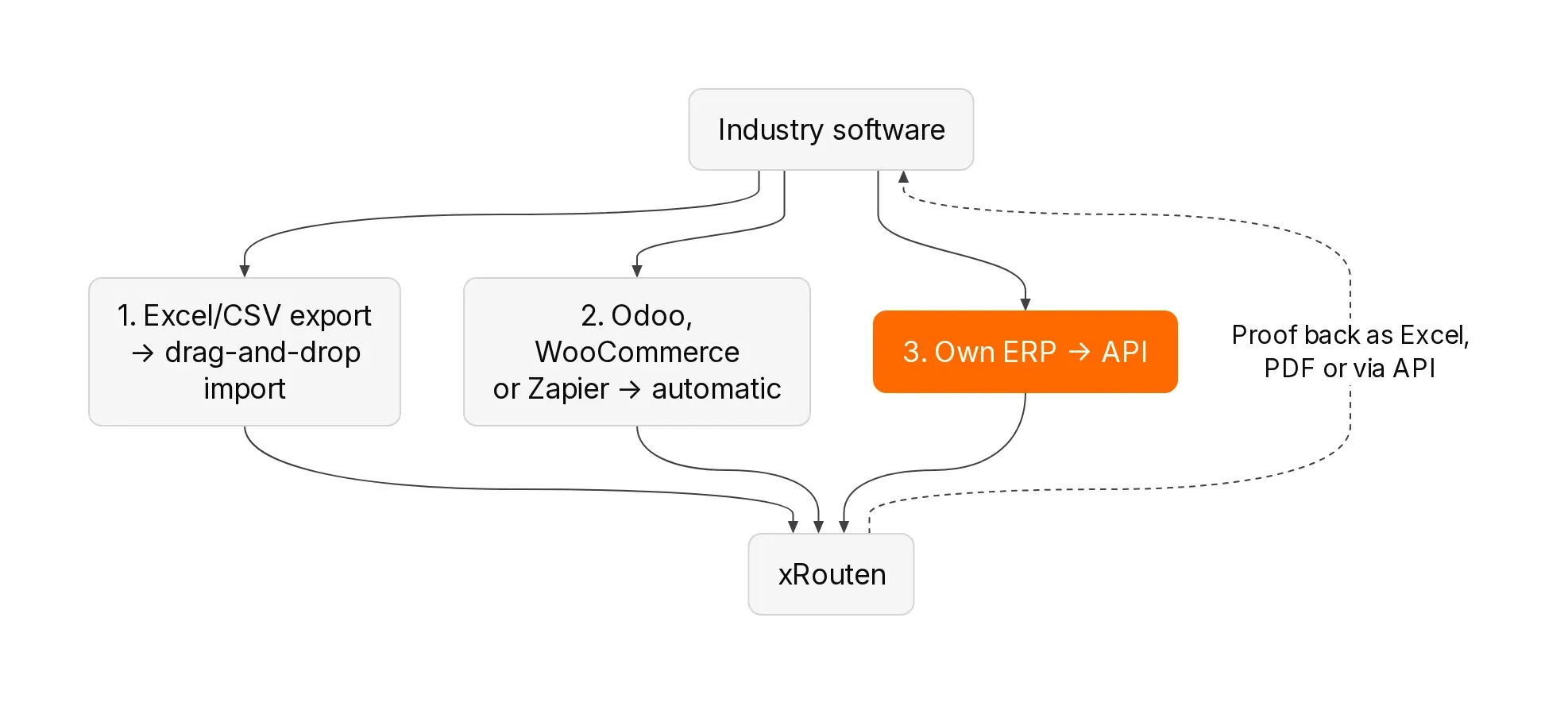
There are three paths. They differ in effort, not in the result on the road.
Path 1: Excel or CSV import
Almost every industry software can export an order list as Excel or CSV. You drop that file into the route planner and optimise. You need neither IT nor an appointment with your software vendor.
In xRouten the import works by drag and drop, via “Browse files”, or by copy and paste from Excel. Columns are detected automatically. At minimum you need street and postcode or city. Divergent column names from your ERP are stored once in settings; after that xRouten recognises them on every import. For fields such as order number or customer number you create custom columns. All steps are in the guide Importing stops (in German).
<b>Customer example MeinFrühstück24:</b> The franchise delivers breakfast in a tight time window. Orders come through its own web portal. Today, according to the customer story (in German), a CSV file with next-day orders is dropped into xRouten and “Optimise” is clicked. Drop-off points, customer names and products are carried over. What used to take an hour a day is done in 5 minutes.
<b>When import is enough:</b> when you plan once a day and few orders arrive later. A rush job at 11 a.m. is added by hand.
Path 2: Ready-made integration or automation
If your industry software is among the systems with a ready connection, orders flow across automatically. On xrouten.com / xrouten.de you will find connections to Odoo and WooCommerce plus automations via Zapier. Zapier links apps on the principle “When something happens in system A, do something in system B”.
<b>Example (constructed, not a customer case):</b> A drinks merchant with a WooCommerce shop and three vehicles. Orders land automatically as stops in xRouten; the dispatcher plans instead of retyping. Invoices and stock stay in the shop.
Path 3: API and custom interface
An API is a programming interface through which two systems exchange data directly. Practically any system can be connected, including custom-built ones. The xRouten API documentation is public and covers stops, routes, imports and proof of delivery. PDFs such as delivery notes can also be uploaded programmatically and assigned to stops (Guide: Signing PDFs — in German).
<b>Customer example KANOLD:</b> The winter-service and grounds-maintenance company has worked with its own ERP including a customer portal since 2015 and plans more than 10,000 sites before each winter season. According to the customer story (in German), xRouten connects to the ERP via an interface and takes over visualisation, planning and — above all — driving the routes. Tens of thousands of site sketches also arrive as PDFs automatically. The ERP remains the heart of the system. Managing director René Rehag says: “xRouten has integrated smoothly into our system landscape and complements it in exactly the right places.”
For an API connection you need someone to build it — your software vendor or an IT partner. On Plan and optimise routes / the German page Routen planen und optimieren the message is: “We will help you with that.”
7. How do status and proof of delivery flow back into industry software?
The return path decides whether the office still assigns photos in the evening.
What is created at the stop?
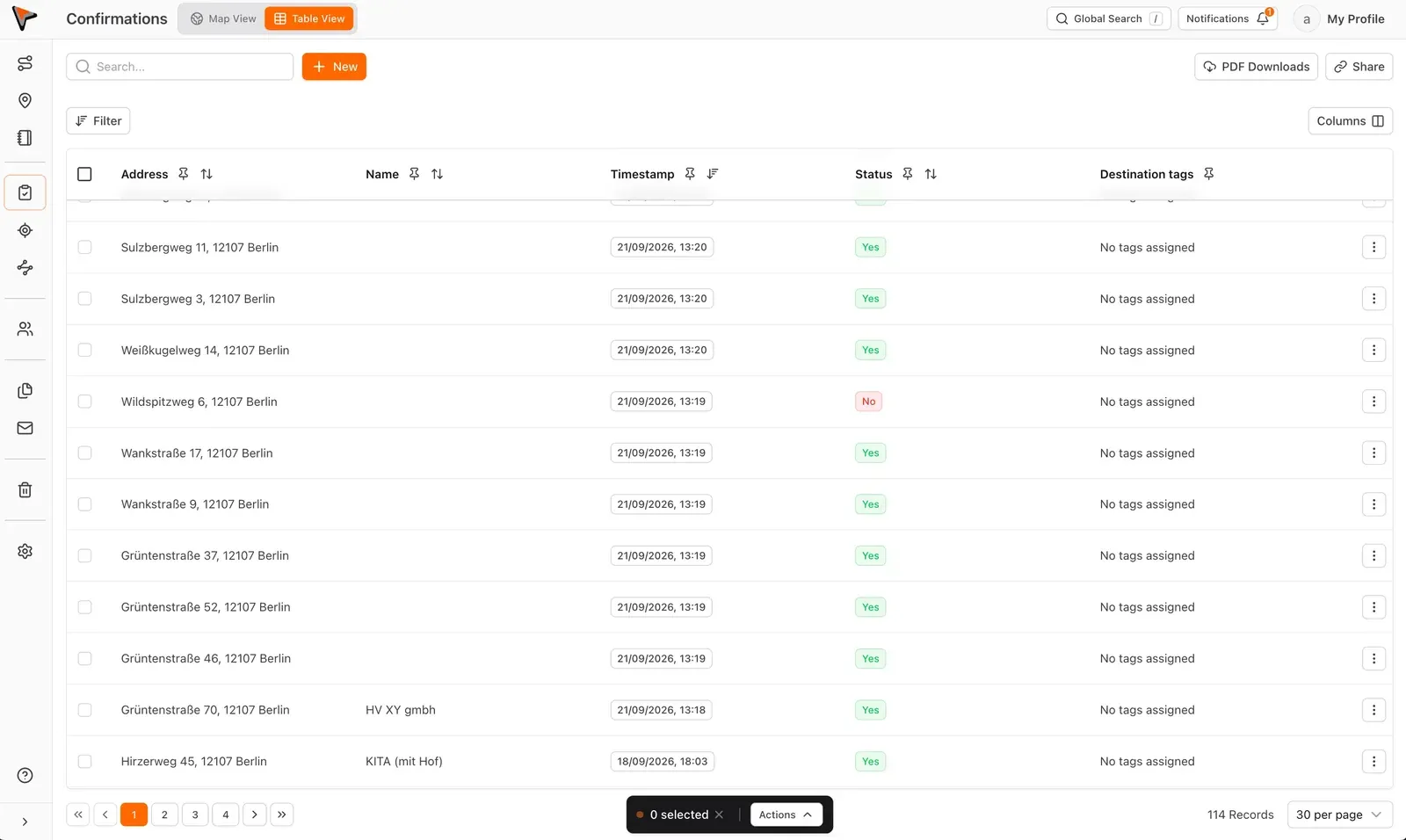
In the xRouten mobile app the driver creates proof at the stop with photos, signature, checklists and custom fields. Every proof gets a timestamp. Which fields appear at which address is set per stop or for a whole route (Guide: Custom proof fields — in German).
How do the data come back?
- <b>Excel export:</b> In “Proof” you filter by route, category or period and export as Excel. You choose which columns appear; xRouten remembers the selection for the next export (Guide: Exporting proof — in German). Include the order number from the import as a column so your industry software can match every row to the right order.
- <b>PDF export:</b> Single or multiple proofs go out as PDF, for example as an invoice attachment. Export is unlimited and included in every plan (Documenting routes — in German).
- <b>Via API:</b> Proof can be retrieved via the API and stored directly on the order in the ERP. The documenting-routes page states: “Via integrations and API access, documentation flows straight into your existing systems.”
- <b>Directly to the customer:</b> Optionally your customer receives an email with proof after the stop. The tracking link with ETA can be sent when the driver starts, three stops before, or with the proof (Guide: Tracking link — in German).
MeinFrühstück24 reports that automatic emails with photos make a strong impression on customers and that complaints have fallen sharply since (customer story — in German).
Who owns the proof?
You do. With xRouten you export and delete your documentation yourself at any time. xRouten does not access or analyse the documentation. Data is not locked behind a plan, even if you switch providers (Documenting routes — in German).
8. Which path fits your business: import, integration or API?
| Criterion | Excel or CSV import | Ready integration (Odoo, WooCommerce, Zapier) | API or custom interface |
|---|---|---|---|
| Prerequisite | Your industry software can export lists | Your system is among the connected systems | Someone builds the connection |
| Effort to start | Low — usable on day one | Set up the connection | Project with your software vendor or IT partner |
| Mid-day orders | Add by hand or re-import | Flow across automatically | Flow across automatically |
| Return path for proof | Excel or PDF export | Depends on the integration; otherwise export | Directly via API onto the order |
| Fits | Entry, trials, businesses that plan once a day | E-commerce and businesses on Odoo | Custom ERP, high order volumes, many attachments |
Our recommendation: start with import even if you want an API later. During the trial you learn which fields you really need. That list then becomes the blueprint for the interface.
9. What else should you check when choosing route planning software alongside industry software?
When you connect a route planner to your industry software, check these five points. A comparison of specific vendors with prices is in the guide Route planning software compared (in German); see also xrouten.com/pricing.
Interfaces in both directions
Ask not only how orders come in, but also how proof goes out. Otherwise double entry simply moves to the end of the day. Check whether there is an Excel export with freely chosen columns and whether the API is publicly documented.
Data protection and server location
Addresses, photos of properties and signatures are personal data. Clarify where the servers sit and whether a data processing agreement (DPA) under Art. 28 UK GDPR / GDPR is offered. With xRouten data sits on EU servers in Germany (Frankfurt), and a DPA is available (Pricing).
Location without surveillance
Drivers often react sensitively to the word “GPS”. Ask whether location is captured continuously in the background or only on demand. xRouten captures location only when the employee turns on the GPS switch in the app. No vehicle hardware is required (Driving routes — in German).
Usability for drivers
In the trial, let a new driver and an experienced driver each run a route. At KANOLD the verdict, according to the customer story, is: “New colleagues can get started after a short briefing.”
Pricing model
Industry software is often licensed per user or as a package; route planning software is usually priced per vehicle or seat. Calculate with the number of vehicles on the road at the same time, not the number of staff. With xRouten the route planner starts at €25 per month and the mobile app at €10 per month, each excl. VAT. If 10 staff share 5 vehicles, 5 seats are enough according to the pricing page. There is no minimum term on monthly billing.
10. Where are the limits of xRouten as a complement to industry software?
So you do not test with the wrong expectations: this is what xRouten is not. The points are also listed on Plan and optimise routes (in German).
- <b>Not an ERP or CRM replacement:</b> xRouten does not write invoices, manage stock or contracts. It plans, drives and documents routes.
- <b>Built for 2 to 30 vehicles:</b> For corporate logistics with hundreds of vehicles and a dedicated transport department, specialised systems exist.
- <b>Not for time-based planning:</b> If your planning is driven by rosters and qualifications, as in home care, your industry software’s module is the better choice.
- <b>Not a telematics system:</b> No black box, no OBD dongle, no continuous background tracking.
- <b>Not a pure routing API:</b> xRouten is a finished application for dispatch and drivers, not an algorithm to embed in your own software.
If any of these points is a deal-breaker, skip the trial. If not, the split of work fits: your industry software stays; xRouten complements it.
11. How do you start without touching your industry software?
For the beginning you need neither an interface nor an appointment with your software vendor.
- <b>Export the order list:</b> Export a normal day’s orders as Excel or CSV. Address, order number, time windows and driver notes matter most.
- <b>Import and map columns:</b> Drop the file into xRouten. Create custom columns for order number and other fields so they reappear in the export later.
- <b>Split across vehicles and optimise:</b> Split the list across your vehicles and optimise each route (Guide: Splitting routes, Guide: Optimising a route — both in German). Compare kilometres and driving time with your current plan.
- <b>Define proof fields:</b> Decide what should be captured at the stop — for example photo, signature and comment.
- <b>Drive one day:</b> Let two drivers run a day with the app and ask in the evening what was missing.
- <b>Test the return path:</b> Export the proof as Excel with order number and push ten records back into your industry software as a test.
After that you decide whether import is enough or whether an integration or API should replace it. Guides are at xrouten.de/anleitung (in German), industry examples at xrouten.com/industries (and xrouten.de/branchen), and more guides on the xRouten blog.
12. Conclusion: your industry software stays; the road gets its own tool
The question “industry software or route planning?” is the wrong one for most businesses. Industry software is where orders are created and billed. Route planning software is where an order list becomes a driveable route and every stop becomes a record.
If your dispatcher sorts addresses in Google Maps in the morning and assigns WhatsApp photos in the evening, you do not need better industry software. You need the link between office and road. You build that most easily with an Excel file first — and later, when it pays off, with an integration or API.
If you run one vehicle on fixed routes, or plan as a home-care provider by roster, stay with your industry software’s module. That is a good decision too.
<b>Try xRouten free for 14 days. The trial ends automatically — no cancellation and no payment details required.</b> Export one day’s orders from your industry software, import the list and let your routes be optimised: Plan and optimise routes now
Frequently asked questions about industry software and route planning software
What is the difference between industry software and ERP systems?
An ERP system connects procurement, sales, warehouse, HR and accounting on a shared data foundation and is designed to work across industries. Industry software is tailored to the workflows of a specific industry — for example trades, home care or waste collection. Industry software can be an ERP for one industry or cover only part of it.
What is ERP route planning?
ERP route planning means either a routing module inside the ERP or standalone route planning software connected to the ERP. In the second case, orders arrive via import, integration or API; the route planner calculates sequence and vehicle assignment and reports status and proof back. Billing and master data stay in the ERP.
Is my industry software’s routing module enough?
It is usually enough for one vehicle, fixed routes, few stops per day, or time-based planning such as home care. Dedicated route planning software pays off once several vehicles visit changing addresses daily, time windows and quantities matter, or you need proof per stop.
Do I need an interface between ERP and route planning software?
Not to start. Almost every industry software exports orders as Excel or CSV, and the route planner imports them. An interface pays off when many orders arrive during the day or proof should land on the order automatically. xRouten offers integrations with Odoo, WooCommerce and Zapier plus a publicly documented API.
Can I start with an Excel export from my industry software?
Yes. Export one day’s orders with address, order number and notes, drop the file into xRouten and map the columns. Divergent column names are stored once in settings; after that xRouten recognises them automatically. MeinFrühstück24 plans this way via CSV and needs 5 minutes instead of an hour according to their own figures.
How do photos and signatures get back into industry software?
Via Excel or PDF export or via API. For Excel export you choose the columns in xRouten yourself. Include the order number from the import so your industry software can match every row to the right order.
Does dedicated route planning software make sense for home-care providers?
Usually not. In ambulatory care, routes hang on roster, qualifications, preferred times and service billing. Those data live in the care software, which usually ships its own routing. xRouten is built for location-based dispatch — for example delivery, waste collection, winter service and on-site service.

Try xRouten free for 14 days
Try it now