

Why field service is the hard case
Office time tracking is close to solved. Field service is not, and the reasons are structural: the work happens in different places every day, connectivity is unreliable, travel time is hard to classify, and the people doing it are out of sight of whoever is responsible for the records.
At the same time the records have to be right. Wage and hour claims are among the most common employment disputes in the US, and in most of them the employer's own records are the primary evidence. Weak records are not a neutral position; they generally work against the employer.
This guide covers the legal basics, the specific challenges of mobile work, how to choose between enterprise and small-business systems, and how to roll one out so that it is actually used.
This is a general overview and not legal advice. Wage and hour rules vary by state and by classification. Check your obligations with your employment counsel.
The legal basics
What federal law requires
The Fair Labor Standards Act requires employers to keep records of hours worked and wages paid for non-exempt employees. It does not prescribe a method: the Department of Labor's position is that employers may use any timekeeping system they choose, as long as it is complete and accurate. A time clock, a phone app and a paper sheet are all acceptable in principle; what matters is that the record reflects what actually happened.
Retention is the part people get wrong. Payroll records are generally kept for three years. The underlying records on which wage computations are based — time cards, work schedules, records of additions to or deductions from wages — are generally kept for two years. Keeping everything for three years is simpler and avoids the distinction entirely.
For exempt employees there is no federal hours-tracking requirement. Many employers track them anyway, for project costing or client billing, which is fine as long as it does not undermine the exemption.
What state law adds
This is where it gets specific. Several states impose daily overtime, meal and rest break requirements with premium pay for missed breaks, and their own record-keeping rules. California is the most demanding but not the only one. If you operate across state lines, the practical answer is usually to build the system around the strictest state you operate in rather than maintaining several regimes.
Employee monitoring and GPS
Location tracking of employees is regulated separately from time tracking, and the rules vary considerably by state. Several states require notice, and some require consent, before tracking a vehicle or a device. Tracking outside working hours is a particularly exposed area.
The practical rule is straightforward: tell people what is tracked, when it is tracked, who can see it and how long it is kept, and put it in writing. Covert tracking is both legally risky and the fastest way to destroy trust in a field team.
The specific challenges of field work
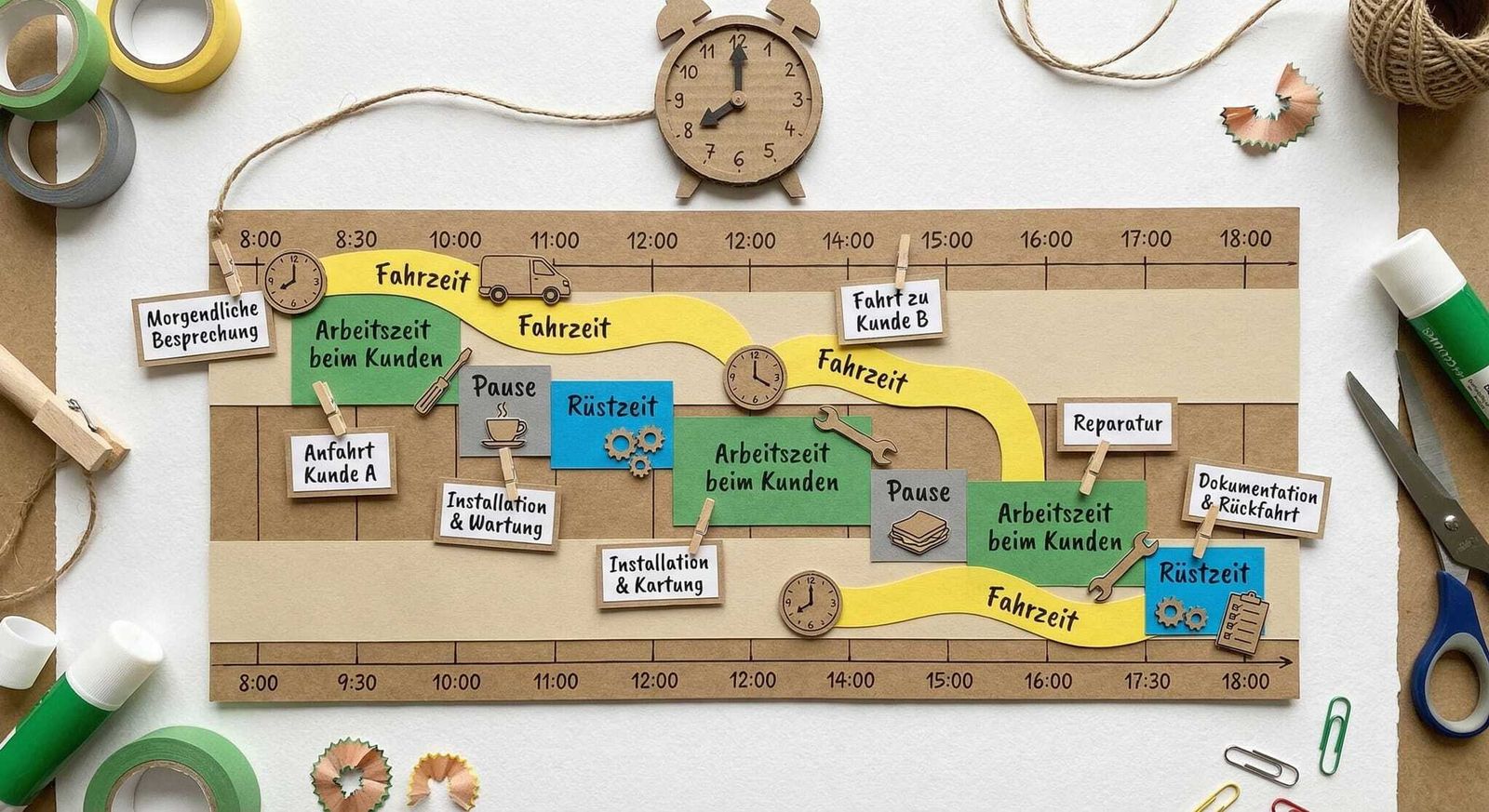
Changing locations
Field staff are rarely at the same place two days running. Customer visits, job sites, trade shows, service calls — the working environment changes constantly. A time tracking system has to accommodate that, ideally with location capture, because "I was at the Henderson job" is a much stronger record than "I worked eight hours".
Travel time versus work time
This is the single biggest source of disputes. When does the working day start — leaving the house? Arriving at the first customer? What about travel between two customers?
The general federal framework: an ordinary commute from home to a regular workplace and back is not compensable. Travel between job sites during the working day generally is. Once the first principal activity of the day has started, the continuous workday rule means most of what follows until the last principal activity ends is working time. Travel away from home overnight has its own rules.
Where this actually goes wrong is at the edges: a worker who loads the van at home, or picks up parts on the way in, may have started the working day earlier than the employer assumed. Without clear written rules and a system that captures the sequence, these become arguments after the fact — and a system that records where and when things happened is what settles them.
Working offline
There is no reliable cell signal in every basement, every rural service area or every steel-framed building. A system that only works online is unusable in the field. Offline capability with automatic sync when connectivity returns is not a nice-to-have; it is a requirement.
Getting people to use it
A lot of field staff experience time tracking as surveillance. If the system is also awkward to use, adoption collapses and you end up with records that are worse than what you had. The solution has to be quick — ideally one tap — and interrupt the day as little as possible.
The office/field gap
In many companies the office is already on a system while the field is still on paper or on trust. That gap is where the compliance exposure sits, and closing it is usually the reason this project exists at all.
Enterprise or small business?
The deciding factor is usually not the industry but company size and complexity. There are two fundamentally different approaches.
| Criterion | Enterprise (e.g. SAP SuccessFactors, Workday) | Small business (e.g. Connecteam, Jibble, QuickBooks Time) |
|---|---|---|
| Built for | Large employers, 500+ | Small and mid-sized, 1–50 |
| Setup | Weeks to months, usually with a consultant | Hours to days, often with free setup support |
| Cost | Individual pricing, usually four figures a month and up | Transparent, a few dollars per user per month |
| Complexity | High, in exchange for deep configurability | Low, in exchange for working immediately |
| Mobile app | Yes, but part of a large ecosystem | Yes, standalone and built for mobile first |
| Offline | Limited, depends on configuration | Usually complete, with automatic sync |
| GPS | Possible, often an add-on module | Usually integrated, including a live view |
| Integrations | Full ERP and HR ecosystem, extensive API | Payroll providers, spreadsheet export |
| Scheduling | Yes, as part of the HR suite | Yes, usually drag and drop |
| Customization | Very high — workflows, rules, approvals | Limited; focused on core functions |
| Reporting | Extensive, with BI connectivity | Basic reports and exports |
| Training effort | Medium to high | Minimal |
When enterprise
- Your company already runs an ERP or HR suite and time tracking should integrate seamlessly
- You need complex working-time models, union agreements or multi-site approval workflows
- You manage hundreds or thousands of employees and need detailed analysis across departments and locations
- Automated validation and alerts on working-time violations are essential
When small business
- You have a small to mid-sized team that should be running quickly, without a months-long project
- Your people are in the trades, on job sites, in service or in sales, and need something that works without a signal
- Simplicity and adoption matter more than maximum configurability
- You want something cost-effective and immediately usable that is still compliant
The enterprise route in practice
An enterprise HR suite gives you time off, timesheets and time tracking as part of a larger system. Staff can record time on mobile with self-service functions that reduce administrative load.
Strengths for field service: seamless integration into an existing HR, payroll and controlling landscape; configurable working-time rules, break rules and approval workflows; extensive reporting and analysis; regular cloud updates with no IT effort of your own.
Challenges: high entry cost and ongoing licence fees; implementation often takes months and requires consulting; offline capability rarely matches a dedicated mobile app; overkill for small teams; no published standard pricing, so every evaluation starts with a sales conversation.
The small business route in practice
Mobile-first time tracking products aimed at small and mid-sized employers focus on simplicity, mobile use and a fast start.
Strengths for field service:
- Offline capability: the app works without a connection and syncs automatically when one returns — essential on job sites and in rural areas.
- GPS location capture: a live view of where people are, so you can also show a customer when your team was on site.
- Job and project allocation: time is allocated directly to jobs or customers, with switching between them that does not interrupt the record.
- No special hardware: runs on any phone, tablet or computer, and a tablet can serve as a fixed clock-in terminal.
- Payroll integration: direct connection to common payroll providers, or spreadsheet export.
- Fast setup: often with guided onboarding at no extra cost.
These products deliberately concentrate on the core: time tracking, time off and scheduling. If you want straightforward mobile time tracking that is quick to introduce and reliable in the field, this is where to look.
Quick check
| Question | → Enterprise | → Small business |
|---|---|---|
| How many people record time? | 100+ | 1–50 |
| Do you already run an ERP or HR suite? | Yes | No |
| Do you need complex approval workflows? | Yes | No |
| How fast does it have to be running? | Months are fine | This week |
| Budget? | Four figures a month and up | A few dollars per user |
| Do teams often work offline? | Rarely | Often |
| How comfortable are your field staff with technology? | Mixed | Not very |
The point: there is no better or worse here, only fits and does not fit. A 15-person trades business does not need an enterprise HR suite. A company with 5,000 field staff will not get far on a lightweight app alone.
Rolling it out
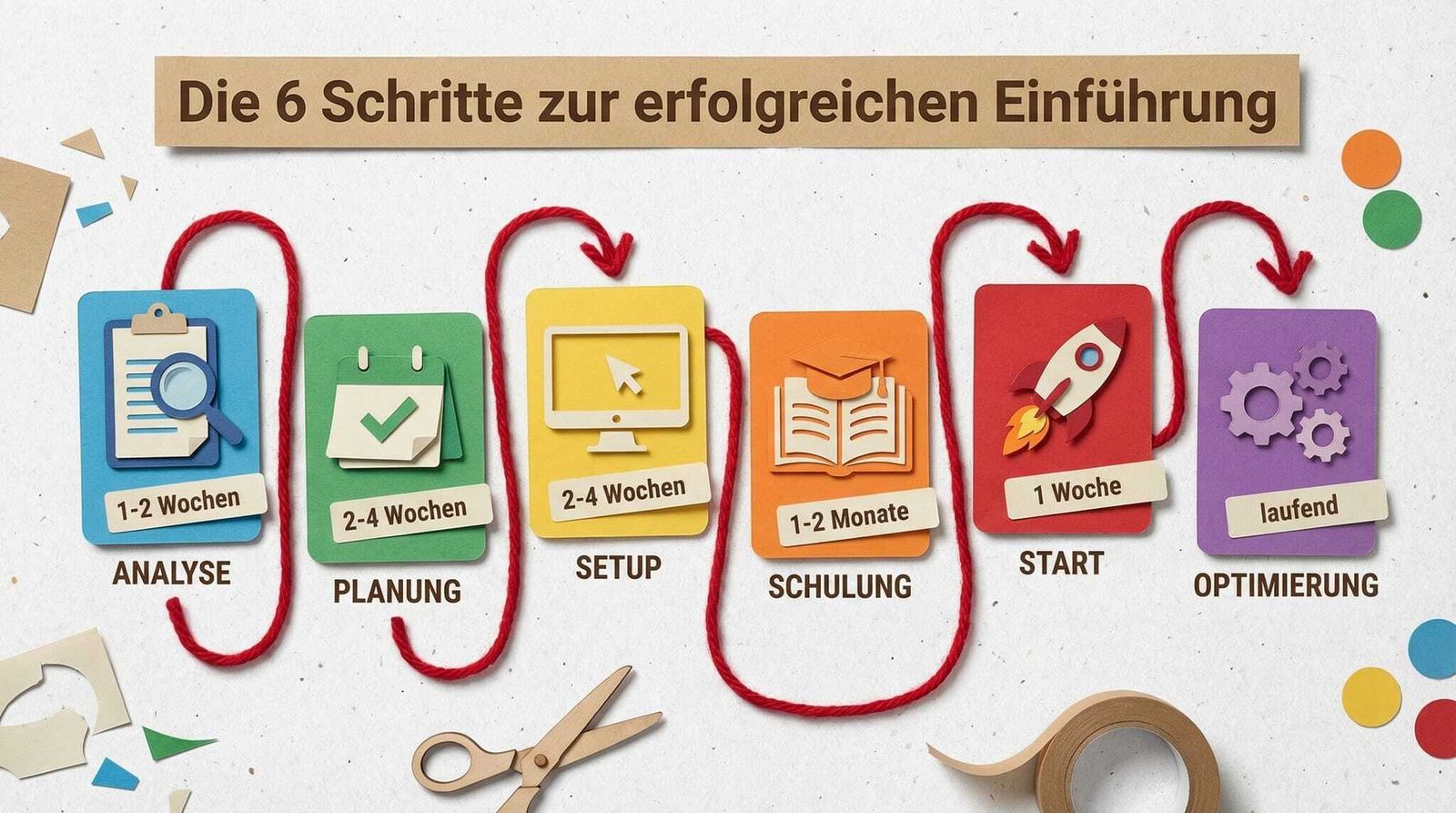
The best software fails if the rollout is badly planned. These steps have proven themselves.
1. Work out what you actually need
Before choosing anything: how many people are in the field? What working-time models exist? Which systems — payroll, ERP — have to connect? What requirements apply specifically to your industry and your states?
2. Bring people in early
Changes to time recording are sensitive, and in a unionized workplace there may be bargaining obligations around introducing or changing a monitoring system. Even without that, involving people early costs less than fixing resistance later.
3. Choose and test
Use the free trials. Include field staff in the trial — their feedback decides adoption later. Test specifically in your worst-signal location, not in the office.
4. Train and communicate
Be open about why time tracking is being introduced — legal obligation and accurate pay, not surveillance. Offer short training, ideally directly on the phone. Write down the rules for travel time and circulate them.
5. Introduce and keep improving
After rollout, gather feedback regularly. Review the written rules as the work changes.
What works and what does not
Do
- Prioritize simplicity. It has to work in one tap. Every additional step costs adoption.
- Turn on clock-in reminders. Push notifications remind people to clock in and out, which is how you avoid gaps.
- Define travel time rules in writing. Set out which travel counts as working time and which does not, and have people acknowledge it.
- Use the data for more than payroll. The analysis shows where time goes, which feeds directly into more efficient route planning.
- Be transparent about privacy. Explain what is captured, who can see it and how long it is kept.
Do not
- Track location without notice. Covert monitoring is legally exposed in many states and destroys trust everywhere.
- Put a large system into a small team. A 10-person trades business does not need an enterprise HR suite.
- Skip the people affected. Bad for morale, and in some workplaces a legal problem.
- Run different systems for office and field. That means duplicate administration and two sets of numbers that never quite agree.
Where this is going
Time tracking in field service is not an optional exercise; it is a legal obligation, and at the same time an opportunity for more efficiency and transparency. Geofencing — automatic clock-in and clock-out when entering or leaving a defined area — will grow in importance, and combined with self-learning methods will increasingly displace manual entry altogether. The interesting question is less whether that is technically possible and more where the line sits between convenience and surveillance, which is a policy question rather than a product one.
This guide was written in March 2026. The legal position develops — check current requirements regularly.

Try xRouten free for 14 days
Try it now