
The short version
If you drive several stops a day, the number to look at is not the entry price. It is the billing model.
- RouteXL — permanently free up to 20 stops per route, then €35–70 a month. No driver app and no live tracking. Good for a single driver or occasional use.
- xRouten — flat rate from €25 a month, unlimited routes and addresses, mobile app optional at €10 per user. Good for operations with a lot of routes that want a predictable bill.
- OptimoRoute — billed per driver at around $34–44 a month. Technically mature with a lot of features. Sensible when you have a manageable number of genuinely active drivers.
- MyRouteOnline — billed in address credits, €19–799 a month depending on package. Cheap for recurring routes, expensive when addresses change constantly.
In one sentence: flat-rate and per-driver models stay predictable as stop volume grows; stop-based and address-based models get expensive fast. Which one suits you depends on fleet size, stops per day, and how much your addresses repeat.
Prices as published September 2026.
Per driver, per address, or flat?
Anyone driving several stops a day — delivery, field service, trades — knows the problem. Planning by hand costs time, extra miles and therefore money. A good route planner takes that work off you and calculates the most efficient order automatically.
The harder problem is that providers' pricing models barely compare to each other. One bills per driver, another per address, a third simply charges a flat monthly fee. Look only at the entry price and five or ten vehicles later you get an unpleasant surprise. So below are four route planners with optimization, from free to flat rate, and which model suits which size of operation.
What a route planner with optimization actually does
The core of any real route planner is multi-stop optimization: the software calculates the fastest or shortest order for several destinations, instead of you trying combinations by hand. Mathematically this is a variant of the Vehicle Routing Problem — the classic travelling salesman problem extended to several vehicles and intermediate stops.
With several vehicles in play, the software also distributes the stops sensibly across the available drivers. For many operations, fixed time windows matter too — a customer who can only take a delivery between 9 and 12. Capacity limits can be taken into account as well, when a vehicle cannot take any more goods.
Day to day, the benefit shows up first in address import: instead of typing addresses one at a time, you upload a spreadsheet or CSV. Depending on the provider you then get extras such as live tracking, a mobile app for drivers, digital proof of delivery, a CRM connection by customer number, or API access.
Multi-route planning vs a single route
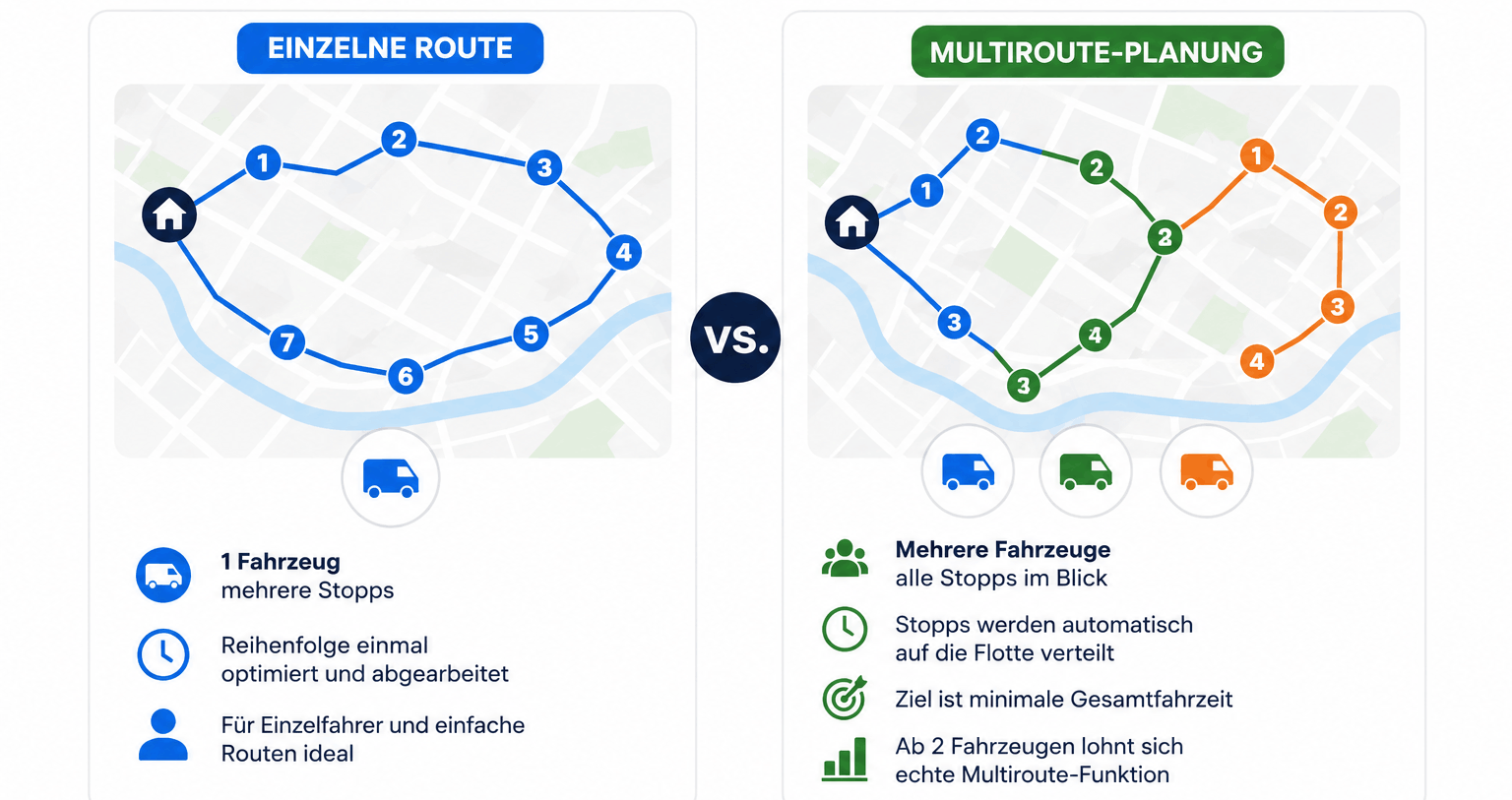
With a single route, one vehicle drives several stops. The order is optimized once and then worked through. With several vehicles out at the same time, multi-route planning distributes all the stops across the fleet automatically, with the goal of keeping total driving time as low as possible without you assembling each route by hand.
With one vehicle, simple route optimization is usually enough. As soon as two or more vehicles are involved, a planner with genuine multi-route capability starts to pay.
Why Google Maps is not enough for professional planning
Google Maps and similar services do let you plan several destinations, but they run into limits fast with a larger number of stops, several vehicles or fixed time windows. If you need to know reliably when a driver arrives at which customer, ordinary map apps have nothing for you. Specialized route planners close that gap and, as SaaS, are generally usable immediately with nothing to install.
How to spot a genuinely cheap pricing model
"Cheap" is worth looking at past the headline price.
Start with the billing model itself. Some providers charge per driver or per vehicle, others per route or per address through a credit system, others again use a flat rate. Equally important is whether there is a permanently free tier or only a time-limited trial.
If you are planning for the long term, look at how the price behaves as you grow. A price that looks attractive with one vehicle can be very different at five or ten, depending on whether billing is per driver or flat.
Check for extras too. Many providers charge separately for SMS packages, API access, proof of delivery, or a minimum number of licences. A cheap-looking entry price can end up above a transparent flat rate.
The four providers
RouteXL: free route optimization up to 20 stops
RouteXL is for people who do not need a full dispatch system and just want a sensible order for their stops. No team signup, no fixed monthly cost.
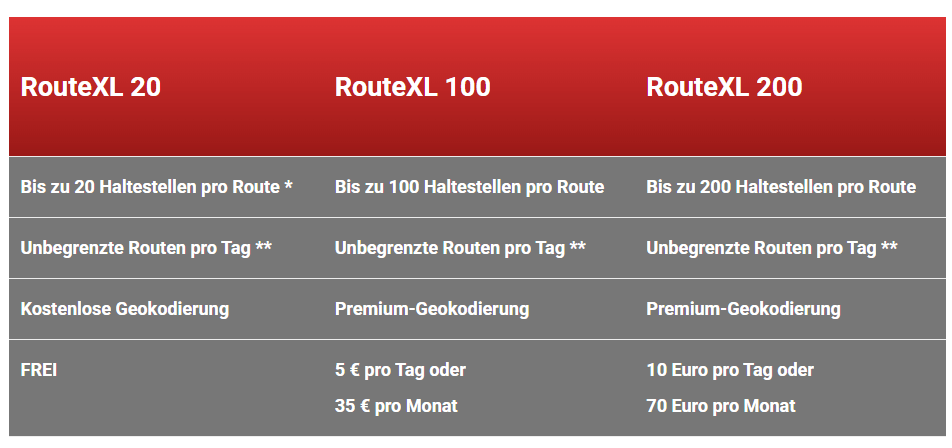
The free RouteXL 20 plan covers up to 20 stops per route and, under a fair use policy, unlimited routes a day. Basic geocoding is included, so addresses are recognized and placed on the map automatically.
For bigger routes, RouteXL 100 costs €5 a day or €35 a month and handles up to 100 stops per route. RouteXL 200 is €10 a day or €70 a month for up to 200 stops. Both paid plans include premium geocoding.
Worth knowing: on any plan there is no driver tracking, no live tracking and no mobile app. The tool concentrates deliberately on optimization alone. Finished routes export in a lot of formats, including common navigation devices and calendar files.
Best for: single drivers, small operations, or anyone optimizing a manageable route occasionally.
Google rating: ★★★★☆ (3.8/5).
xRouten: flat rate from €25/month
xRouten takes a different approach and does not scale by stops or vehicles. Instead of billing each driver separately, you pay one fixed monthly fee for all planning and optimization. Whether you build five routes a day or fifty makes no difference.
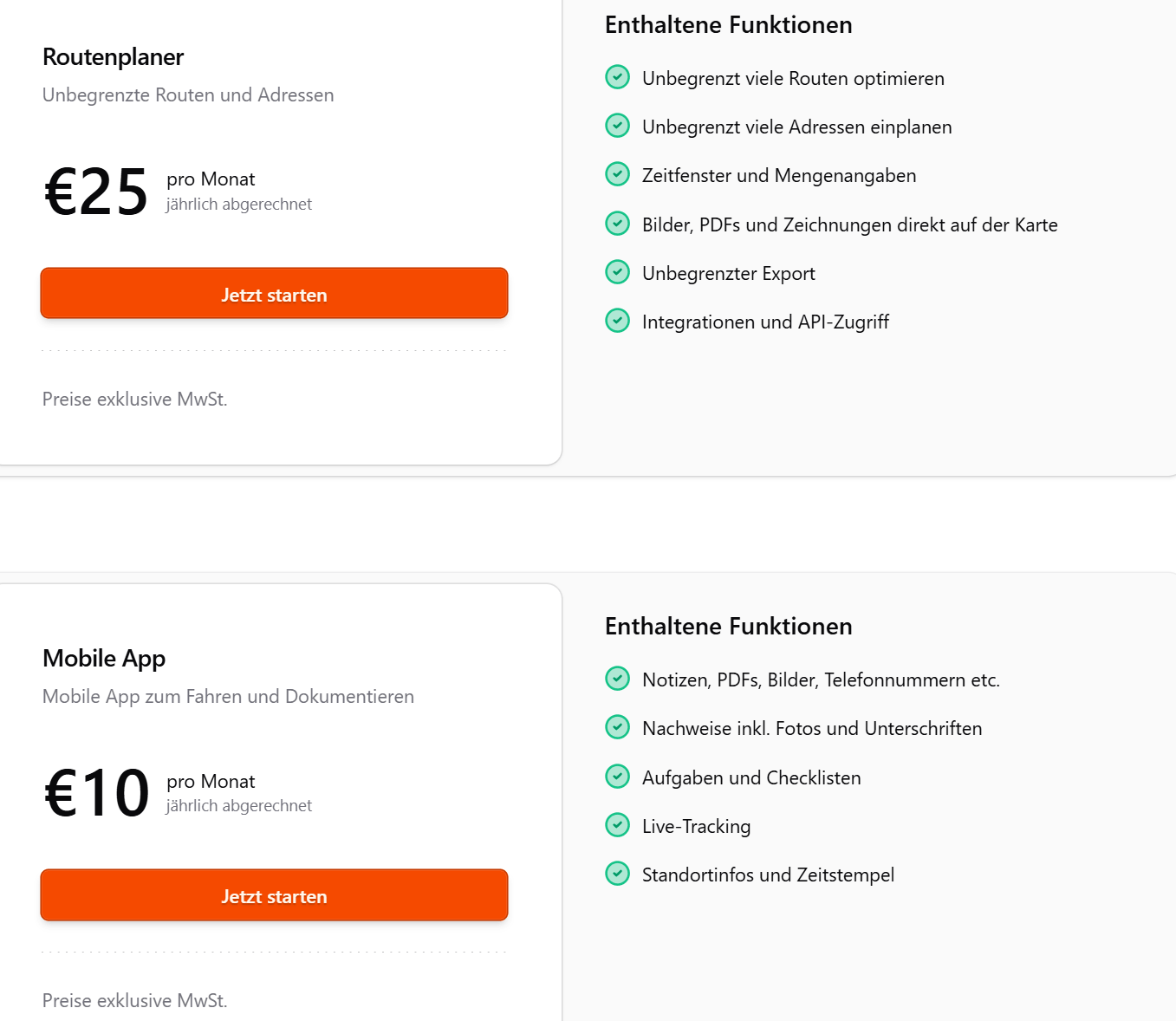
The route planner costs €25 a month billed annually, excluding tax. That includes unlimited routes and addresses, time windows and quantities, images, PDFs and drawings directly on the map, unlimited exports, and integrations plus API access.
The mobile app for drivers is another €10 per user per month. It covers proof with photos and signatures, tasks and checklists, live tracking, and location data with timestamps. There is a 14-day free trial that ends automatically with nothing to cancel.
The decisive advantage: the flat rate for planning stays the same however many routes or addresses go through it. Only the mobile app is billed per user, and only for the drivers who actually need it.
Best for: operations with a lot of routes and hundreds of addresses that would rather pay a predictable flat rate than be scaled by driver count.
Google rating: ★★★★★ (4.9/5).
OptimoRoute: per driver from around $40/month
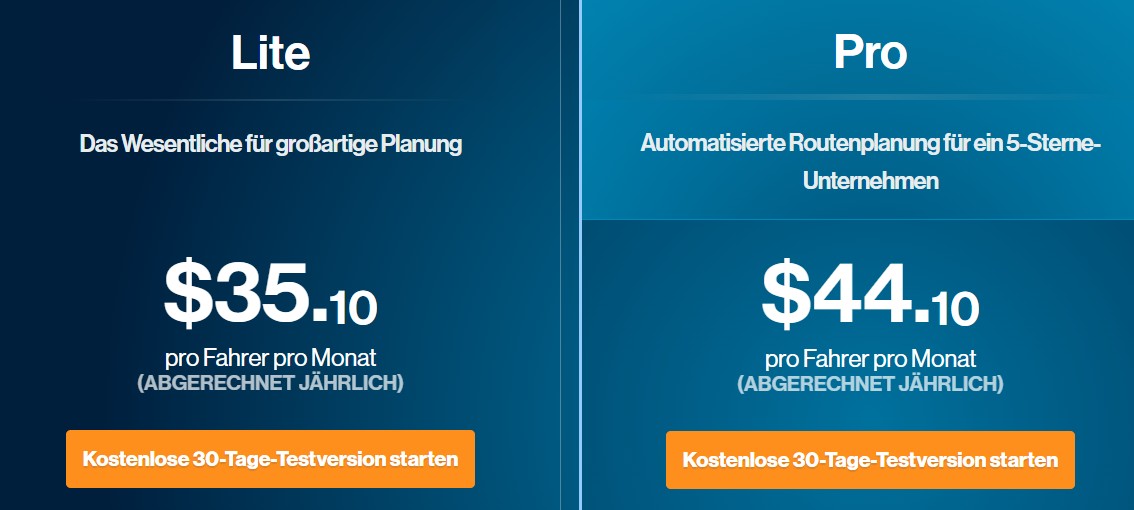
OptimoRoute is one of the best-known providers internationally and bills per driver. That suits operations that need a separate account for each driver anyway. With every extra vehicle the monthly cost rises accordingly.
The Pro version is around $40 per driver per month billed annually: mobile app for drivers, route history, export in many formats, unlimited planning, up to 1,000 orders at once, live tracking, web service API, live ETA and breadcrumbs, analytics, weekly scheduling, real-time order tracking, proof of delivery and customer feedback. There is a 30-day free trial with no commitment.
The important detail in the pricing model is that every route planned in parallel needs its own driver seat, whether or not that driver uses the app. An operation with five vehicles therefore pays around $200 a month on the Pro plan.
Best for: operations that want a technically mature, internationally established product and whose driver count fits the per-driver model — couriers with a fixed driver team, for instance.
Capterra rating: ★★★★★ (4.6/5)
MyRouteOnline: billed per address
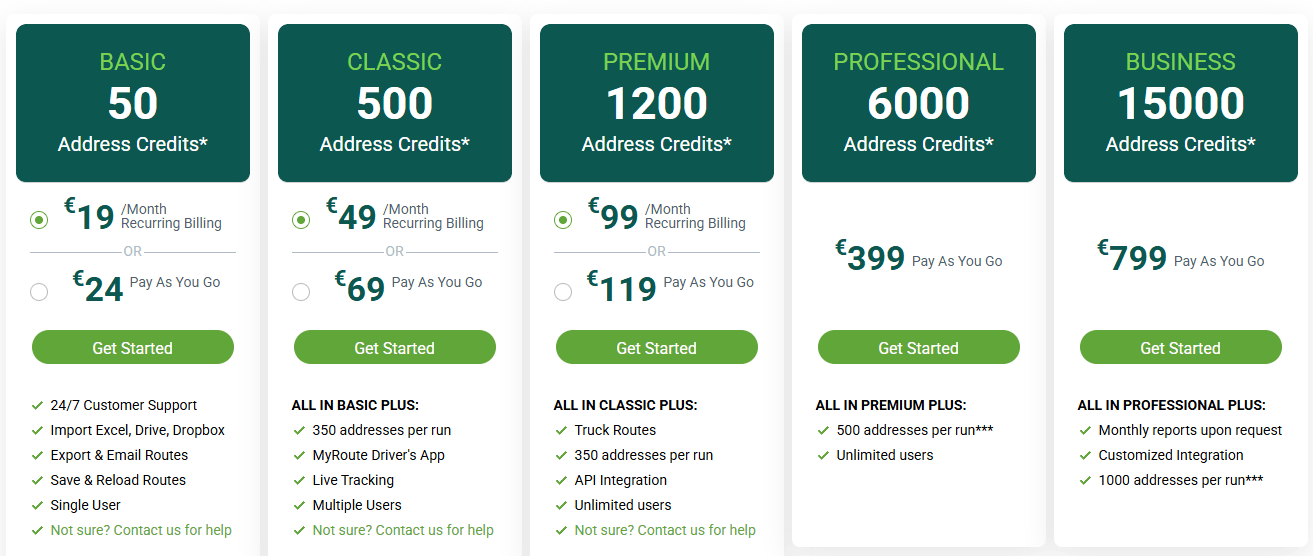
An unusual model: billing is not per user or vehicle but per unique address, using credits. Cost depends on how many distinct addresses you actually plan, which means you can add as many drivers and users as you like without the monthly bill rising. There are two modes: recurring billing, which is cheaper, and pay as you go, which is more flexible and more expensive.
- Basic: €19 a month on subscription or €24 pay as you go, 50 address credits, single user, import, export and route saving.
- Classic: €49 a month or €69 pay as you go, 500 credits, up to 350 addresses per run, driver app, live tracking and multiple users.
- Premium: €99 a month or €119 pay as you go, 1,200 credits, plus truck routes, API access and unlimited users.
- Professional: €399 pay as you go, 6,000 credits, up to 500 addresses per run.
- Business: €799 pay as you go, 15,000 credits, up to 1,000 addresses per run, plus custom integrations and reports on request.
Addresses reused within 30 days do not consume extra credits, which effectively gives you a time window on already-geocoded addresses. That makes the model good for recurring routes. With frequently changing addresses or high order volume — leaflet distribution, couriers with constantly new destinations — it can get expensive faster than a flat rate. A driver app and live tracking only appear from the Classic tier.
Best for: operations with recurring, similar routes and a team that should all reach the planner without per-user costs.
Google rating: ★★★★★ (4.8/5)
All four side by side
| RouteXL | xRouten | OptimoRoute | MyRouteOnline | |
|---|---|---|---|---|
| Rating | ★★★★☆ 3.8 | ★★★★★ 4.9 | ★★★★★ 4.6 | ★★★★★ 4.8 |
| Price | €35–70/month | €25/month flat + optional €10 | ≈ $34–44 per driver/month | €19–99/month |
| Free tier | ✓ permanent (to 20 stops) | 14-day trial | 30-day trial | none permanent |
| Billed by | stop limit | flat, unlimited | per driver | per address (credits) |
| 200-stop route | €70/month | €25/month (included) | ≈ $44/month | €49/month (Classic) |
| Language | English | German | German, English | English |
| Based in | Netherlands | Germany | USA | Israel/USA |
| Best for | single drivers, occasional use | many routes, predictable flat rate | established product, per-driver fits | recurring routes, many users |
What it costs at 30, 100 and 200 stops a day with one vehicle
| Provider | 30 stops/day | 100 stops/day | 200 stops/day |
|---|---|---|---|
| xRouten | €25 | €25 | €25 |
| OptimoRoute (Pro) | ≈ $40 | ≈ $40 | ≈ $40 |
| RouteXL | €35 (RouteXL 100) | €35 (RouteXL 100) | €70 (RouteXL 200) |
| MyRouteOnline | €49–99 | €99–399 | €399–799 |
At 30 stops a day, xRouten, OptimoRoute and RouteXL are all within range of each other. MyRouteOnline already starts at the top of that band. At 100 stops a day, xRouten and OptimoRoute do not move, because neither bills by stop. RouteXL also stays put as long as the individual route is under its 100 limit. MyRouteOnline jumps, because the credits go directly into the price.
At 200 stops a day the differences are stark: xRouten and OptimoRoute unchanged, RouteXL needs its €70 tier, and MyRouteOnline lands between €399 and €799 depending on package — the most expensive option in this comparison.
And what if you need 1, 5 or 10 routes?
Alongside stops per day, the number of routes planned at once matters, and here the differences are larger still.
| Provider | 1 route | 5 routes | 10 routes |
|---|---|---|---|
| xRouten | €25 | €25 | €25 |
| OptimoRoute (Pro) | ≈ $40 | ≈ $200 | ≈ $400 |
| RouteXL | €35–70 | €35–70, but no driver assignment or app | €35–70, but no driver assignment or app |
| MyRouteOnline | from €49 | from €49 | from €99 |
OptimoRoute bills per driver, which is to say per route. What looks cheap at around $40 for a single route adds up quickly: five simultaneous routes is around $200 a month, ten is around $400.
RouteXL can calculate several routes at once through its multiple-rounds feature, and the price stays inside whichever stop tier you are on. The catch is that there is no driver app, no driver assignment and no live tracking, so the routes exist but cannot really be managed or handed out.
MyRouteOnline ties price to credits rather than routes. The Classic tier from €49 already allows several users, which covers 1 or 5 routes. Only when you genuinely need unlimited users does Premium from €99 become relevant.
xRouten stays at €25 regardless of how many routes you plan.
This is the point most people miss on a first price comparison: once it is the number of simultaneous routes that counts rather than the number of addresses, per-driver models get expensive very fast.
Free or paid — when is which enough?
A small delivery operation typically runs 20 to 50 stops per vehicle per day, while self-employed drivers in a car usually deliver between 40 and 60 parcels. Trades such as electricians or plumbers often have far fewer stops — 3 to 10 a day — but spend far longer at each one.
For very small routes, RouteXL's free tier is a good starting point to try route optimization at no cost. As soon as you regularly need more stops, several vehicles, or features like time windows, live tracking and proof of delivery, a paid plan starts to pay for itself.
The question then is which billing model suits your size. If you drive a lot of routes but only a few drivers need a mobile app, a flat rate usually works out cheaper than per-driver billing. Conversely, per-driver can be perfectly reasonable when you have a few very active drivers with real feature needs. And if your routes are mostly the same addresses over and over, MyRouteOnline's credit model rewards exactly that reuse.
Which route planner fits your operation?
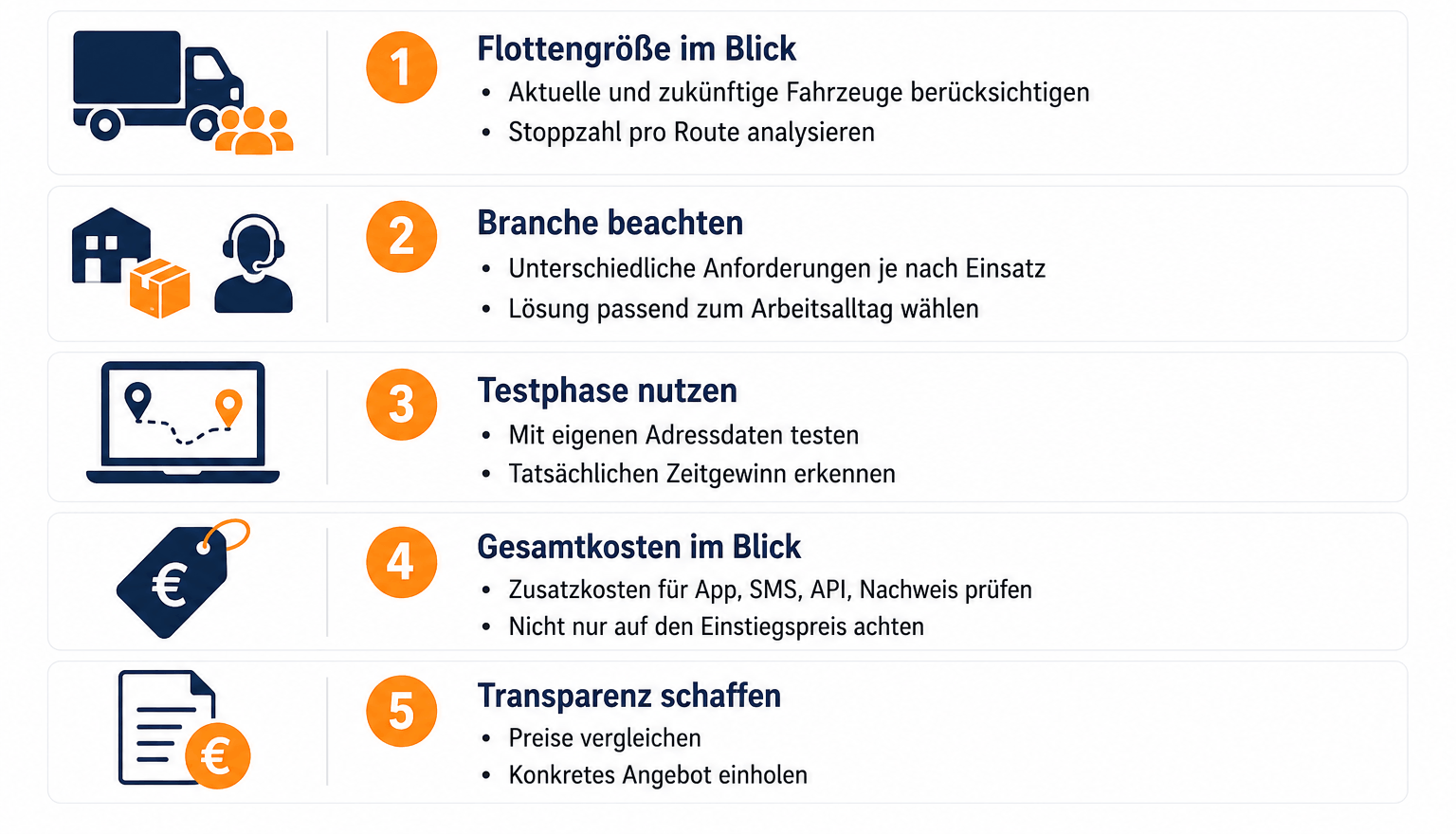
Before deciding, take a realistic look at your fleet — not only the vehicles and drivers you have now, but where you expect to be in twelve months. The actual number of stops per route matters just as much, because that is what decides whether a free tier with a stop limit is sustainable.
Industry matters too. A delivery driver hitting different addresses every day needs something different from a field service rep visiting mostly the same customers. Couriers under time pressure benefit most from a fast, immediately usable tool with clear time windows.
Use the free trial nearly every provider offers, and use it with your own address data. That is the only way to see how much time you would actually save.
And when comparing prices, what counts is the total, not the entry price. Extra fees for the mobile app, SMS, API access or proof of delivery can make a cheap-looking plan considerably less cheap.
Verdict
There is no single cheapest option, because the right choice depends on fleet size, stop count and usage pattern.
If you want to start with no running costs, RouteXL and its permanently free 20-stop tier is the place. Once several vehicles are in play and you need mobile features, xRouten's flat rate usually gives the best value, and stays predictable as volume grows.
OptimoRoute suits operations that want a technically mature, internationally established product and prefer per-driver billing. MyRouteOnline can be interesting for companies with many recurring addresses and several users, since reused addresses cost no extra credits within the window.
Beyond price and features, look at the language of the interface and the support. RouteXL and MyRouteOnline are English-first, which is no problem for international teams but causes friction for others — particularly when drivers are using the mobile app or when support has to be contacted mid-shift.
Before deciding for good, test with your own address data. It is the most reliable way to find out which option genuinely saves time and money.
If you are still unsure, the best route planning software for small businesses has a fuller feature comparison.
FAQ
Are there free route planners with optimization?
Yes. RouteXL's free RouteXL 20 tier covers routes with up to 20 stops, and under its fair use policy you can plan and optimize unlimited routes a day.
What does a route planner cost on average?
From €0 on the free basic tiers to over €700 a month for larger fleets. Small and mid-sized operations should realistically budget €25 to €200 a month. Where you land depends mostly on vehicle count, billing model and which extras you need.
Is a route planner worth it for a small business?
Usually yes, often at only a handful of stops a day. Small savings in driving time and distance are generally enough for the monthly cost to pay for itself. The free trials are a good way to check that against your own addresses first.
What is the difference between a route planner and Google Maps?
Google Maps works well for individual trips but hits limits with several stops, several vehicles or fixed time windows. A specialized route planner calculates the best route across many stops automatically, accounts for arrival and departure times and vehicle capacity, and can connect directly to CRM or ERP systems.
How does a route planner calculate the best route?
At heart, route planners solve a variant of the Vehicle Routing Problem, an extension of the classic travelling salesman problem to several vehicles. All destination addresses are geocoded, placed on the map and then arranged so that driving time and distance between stops stay as low as possible, subject to time windows, capacities and other constraints.
Can route planners handle any number of addresses?
It depends on the plan. Free offerings like RouteXL 20 are capped at 20 stops per route; higher tiers allow considerably more. With providers like xRouten or OptimoRoute the paid plans allow unlimited addresses or orders per driver, with no separate stop limit per route.
How do I get a lot of addresses into a route planner?
With most providers, importing an address list as an Excel or CSV file is enough, sometimes straight from Google Drive or Dropbox. A complete route plan then takes minutes rather than typing each address by hand.
What is multi-route planning and when do I need it?
Multi-route planning means several routes for different vehicles or drivers are optimized at the same time. Instead of calculating each route separately, the software distributes all the stops across the fleet so that total driving time stays as low as possible. It starts to make sense from two vehicles driving different routes on the same day.


Try xRouten free for 14 days
Try it now